The Rank Math PRO backdoor is not a coding bug in the usual sense. According to Rank Math, a limited number of users who downloaded Rank Math PRO version 3.0.123 between 15 October 2026 at 20:02 UTC and 16 October 2026 at 07:12 UTC received plugin files that contained malware. For readers in India, that window runs from 01:32 IST to 12:42 IST on 16 October.
Rank Math removed the affected files and released a clean version, 3.0.124. The incident is tracked as CVE-2026-111862. This guide walks through how to tell whether you are affected, the order to clean things up in, and how to check the result.
What Happened With Rank Math PRO 3.0.123?
Premium plugins usually update from the vendor's own servers rather than from WordPress.org. For about eleven hours, that channel handed out a tampered build that looked like a normal point release.
Rank Math's advisory says the malware could compromise a site if the plugin was activated. Once active, it can:
- Establish persistent access and recreate its hidden backdoor whenever someone visits the site
- Communicate with the domain
rank1cdn.com - Expose database credentials, API keys and other secrets the web server can read
- Plant a fake core file, add
.htaccessrules, create.cachefiles containing PHP, schedule cron jobs and modify other plugins and themes
One detail catches people out. Rank Math's changelog dates the legitimate 3.0.123 to 7 October 2026, more than a week before the bad window. So "we run 3.0.123" does not prove you are affected, and "we are on 3.0.124" does not prove you are clean.
Is Your Site Affected?
Start by logging in to WordPress and opening Plugins to check your Rank Math PRO version and when it was last updated. Then match your situation to one of Rank Math's cases.
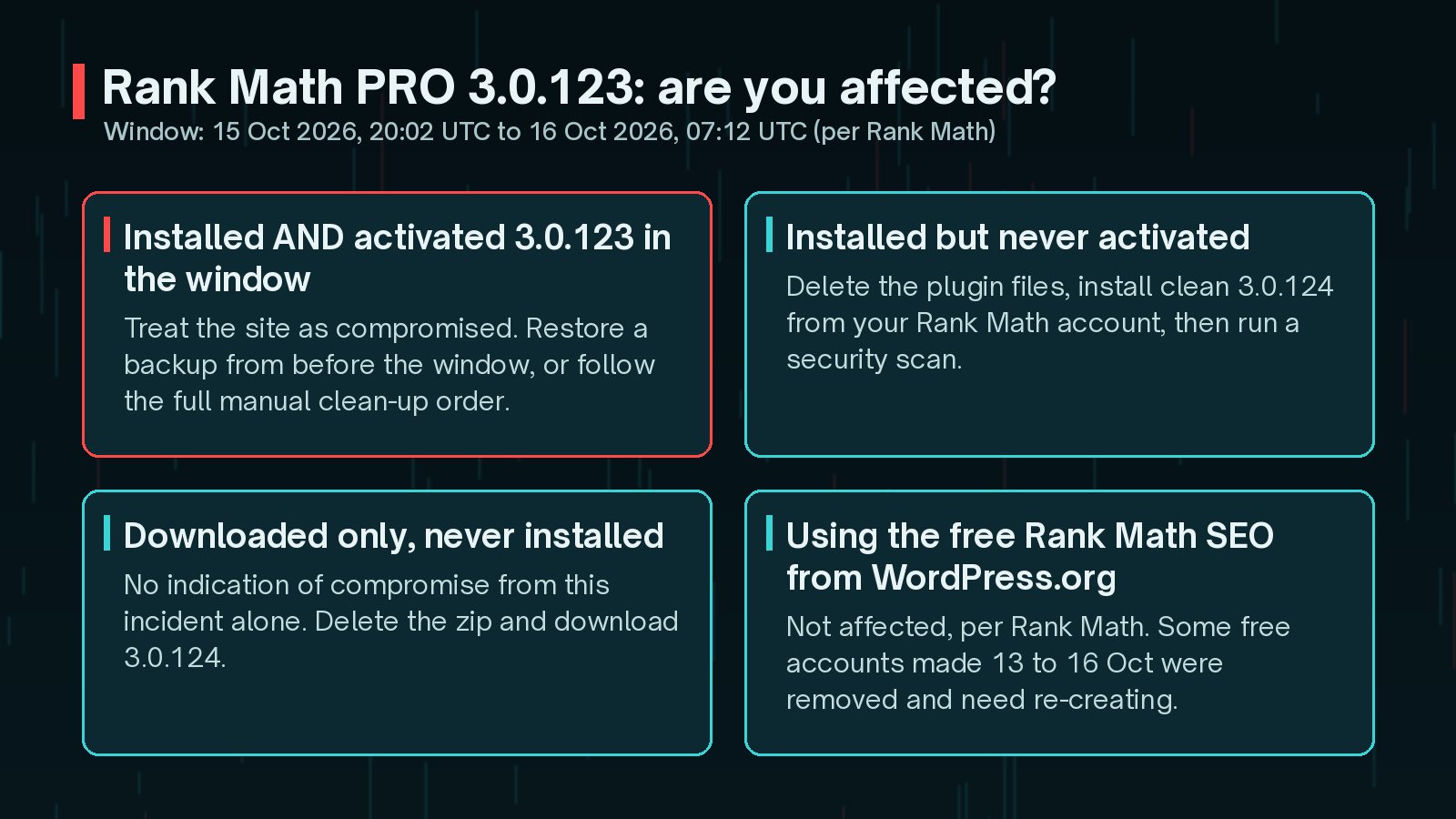
- Installed and activated 3.0.123 during the window: treat the site as compromised and follow the recovery steps below.
- Installed but never activated: delete the affected plugin files, install 3.0.124 from your Rank Math account and run a security scan as a precaution.
- Downloaded but never installed: Rank Math says there is no indication from this incident alone that your site was compromised.
- Free Rank Math SEO from WordPress.org: not affected.
If you manage several sites with automatic updates, check the update logs or your management dashboard for each one. An unattended update during the window is exactly how a site ends up affected without anyone noticing.
Option 1: Restore From a Clean Backup
If you have a backup taken before 15 October 2026 at 20:02 UTC, Rank Math recommends restoring it. It is usually faster and more reliable than a manual clean.
- Restore both the files and the database from the pre-incident backup.
- Run a scan with a reputable security tool.
- Change all passwords and credentials, assuming any secret on the site was exposed.
- Install the clean Rank Math PRO 3.0.124 from your account.
Any content, orders or form entries created since the backup will need to be re-entered or exported first. My guide to restoring WordPress from a backup covers how to do this without losing recent data.
Option 2: How to Clean the Rank Math PRO Backdoor Manually
If a clean backup is not available, work through these steps in order. If you are not comfortable editing files, databases or server settings, this is the point to bring in your host or a security professional.
The order is not a formality. Rank Math is explicit that the malware can rebuild its hidden backdoor whenever someone visits the site, so if you delete suspicious files first, the next page request may simply put them back. Switch off the rebuild mechanism first, then hunt for everything else.
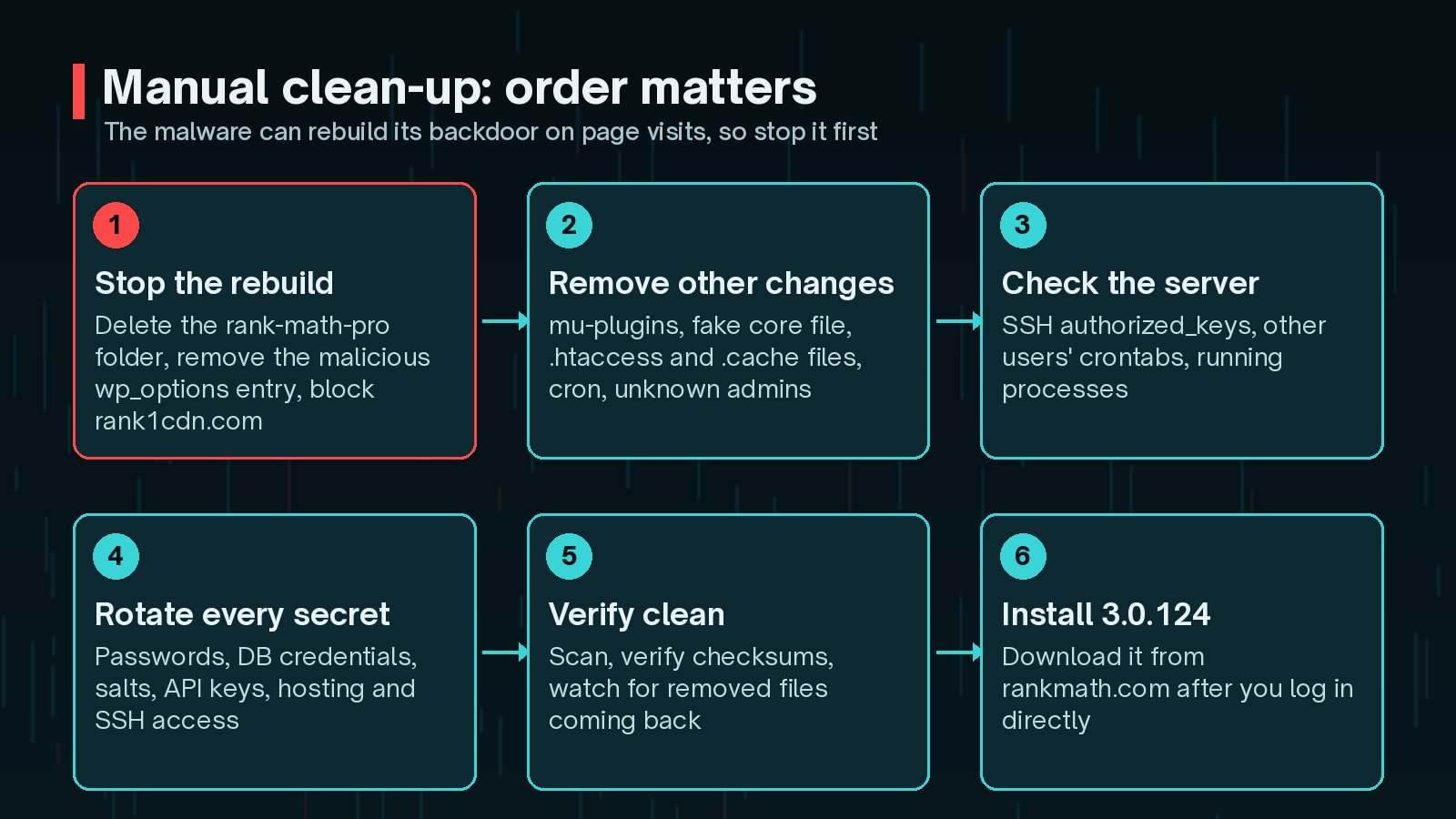
Step 1: Stop the malware rebuilding itself
- Delete the entire
rank-math-proplugin folder using your file manager or SFTP. Deactivating it is not enough. - In the
wp_optionstable, delete any row whoseoption_nameis_uf6qdn2hmm,t8krdk990phbor_np5pvf754c. - Block outgoing connections to
rank1cdn.comif your host or firewall allows it.
With WP-CLI, which handles the table prefix for you, the three options can be removed in one command:
wp option delete _uf6qdn2hmm t8krdk990phb _np5pvf754c
Step 2: Find and remove the other changes
Rank Math lists the places to check. Use this as your working checklist:
- Backdoor files:
wp-content/mu-plugins/, other plugin folders, theinc/,includes/andlib/folders of non-default themes. Look forbase64_decodewith XOR loops, the keyxmmqhn,proc_openor PHP-FPM socket code. - Unknown administrators: usernames starting
wpsupport_or emails ending@wp-mail.net. - Fake core file:
wp-includes/class-wp-cache-util.phpis not part of WordPress. Remove it and verify core. .htaccessand.cachefiles: rules that let.cachefiles run as PHP, and.cachefiles that contain PHP.- Scheduled tasks: system crontab entries tagged
#ms6v46, plus WordPress cron events. - Uploads: PHP files in
wp-content/uploads/, where they generally should not exist.
wp user list --role=administrator
      wp cron event list
      wp core verify-checksums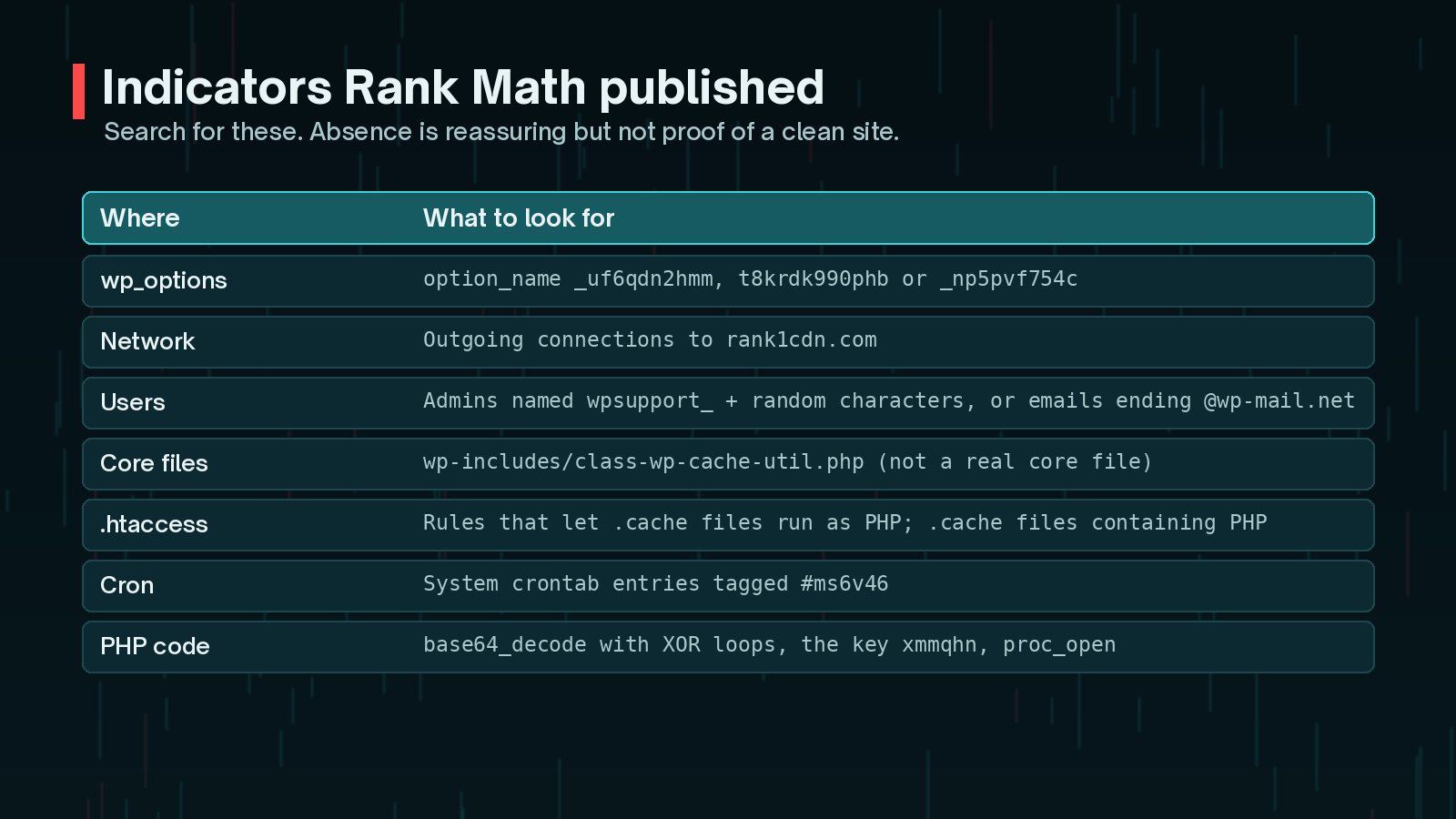
Step 3: Check outside WordPress
The attacker may have made changes beyond the WordPress folder. Review SSH authorized_keys files, crontabs belonging to other system users, running processes and any location the web server user can write to. On shared hosting you will not have access to most of this, so ask your host to check.
For a broader walkthrough of a manual clean, see how to clean a hacked WordPress site. If any administrator accounts look odd, my companion guide on finding hidden admin users in WordPress explains why the Users screen is not always the full picture.
Which Passwords and Secrets Should You Change?
Rank Math calls this step essential even if you restore from a backup. Assume anything the site could read has been exposed.
- All WordPress account passwords, starting with administrators
- Database username and password in
wp-config.php - WordPress security keys and salts
- Payment gateway keys, SMTP credentials and any API keys stored in settings or config files
- Hosting control panel, SFTP and SSH credentials, and secrets in environment variables
- Two-factor authentication for administrators, reset where needed
Regenerating salts logs everyone out, including any session an attacker holds:
wp config shuffle-salts
Watch for follow-up phishing. Rank Math says it will never send login or download links by email. Go to rankmath.com directly to download 3.0.124, and treat unsolicited password-reset or download emails as suspicious.
How Do You Know the Site Is Really Clean?
A clean-up is only finished when you have checked it. Rank Math's verification steps are:
- Run a security scan with a reputable tool.
- Verify core files with
wp core verify-checksums. - Verify plugins with
wp plugin verify-checksums --all. Premium plugins often have no published checksums, so compare against a fresh copy from the vendor instead. - Monitor outgoing connections for the next few days.
- Check whether any file you removed reappears. If it does, the clean-up is incomplete.
Then install Rank Math PRO 3.0.124 and check your SEO settings still look right. Search Console is also worth a look over the following weeks for spam pages or security warnings; these warning signs are the ones I check first.
This incident is one of several plugin issues this month. I have collected the others in WordPress plugin vulnerabilities to patch in October 2026.
Frequently Asked Questions
Is the free Rank Math SEO plugin affected?
No. Rank Math says the issue affects Rank Math PRO users only, and the free plugin from WordPress.org is not affected. Some free accounts on rankmath.com registered between 13 and 16 October 2026 were removed during the response and need to be recreated.
I updated to 3.0.124. Does that mean I am clean?
Not necessarily. Installing 3.0.124 replaces the plugin, but if the bad 3.0.123 was activated, the malware may already have planted files, accounts, cron jobs and database entries elsewhere. You still need to restore or clean, then rotate credentials.
My site shows version 3.0.123. Am I compromised?
Not automatically. A legitimate 3.0.123 was released on 7 October 2026. What matters is whether you downloaded or updated during the window on 15 and 16 October and then activated it. If you are unsure, treat it as affected and check the indicators.
Can a security plugin clean this for me?
A scanner such as Wordfence or Sucuri is part of Rank Math's advice, but the vendor also lists server-level checks such as SSH keys, crontabs and processes that a WordPress plugin cannot see. On shared hosting, ask your host to check those.
Final Thoughts
Supply-chain incidents are uncomfortable because you did everything "right": you kept a trusted plugin updated from its official source. The response is still manageable if you work calmly and in order.
Confirm whether an activated copy came from the window. If it did, restore or clean, starting with the rebuild mechanism. Rotate every secret, verify the result and only then install 3.0.124. Afterwards, harden the site so the next incident is easier to contain.
If you would rather not do this alone, I can help through my hacked site recovery service.
Official References
For the primary sources behind this article, and the latest updates, see: