
A WordPress website revamp is a chance to make the site clearer, faster and easier to manage, but it is also the moment rankings and enquiries are most at risk. This checklist puts the work in a safe order: audit what to keep, simplify the structure, rebuild templates, migrate cleaned content and launch with redirects and measurement ready from day one.

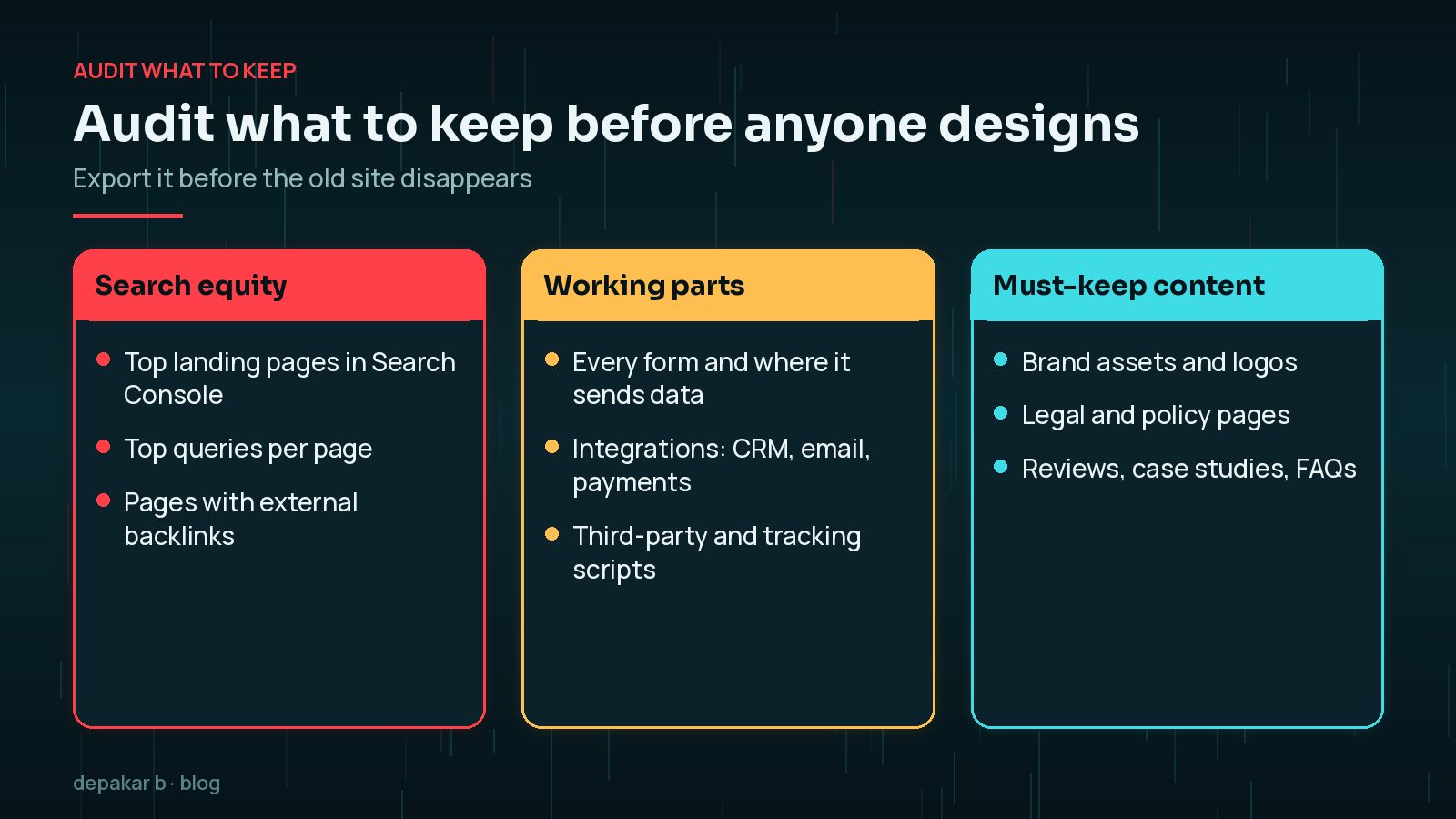
Audit what to keep
Map top landing pages, backlinks, forms, and integrations before redesign.
- Export top Search Console queries/pages
- Inventory forms and third-party scripts
- Note brand assets and legal pages
Why Does the Audit Come Before the Design?
Because the old site is the only record of what is already working. Pages that bring in search traffic, attract links or convert well are assets, and a redesign that drops or renames them without a plan can undo years of progress. Export the performance data from Search Console and analytics, crawl the current site to get a full list of URLs, and note every form, integration and tracking script. It is much easier to collect this before the old site is switched off than to reconstruct it afterwards.
Information architecture
Simplify navigation around real visitor jobs.
- Define primary journeys
- Cut duplicate thin pages
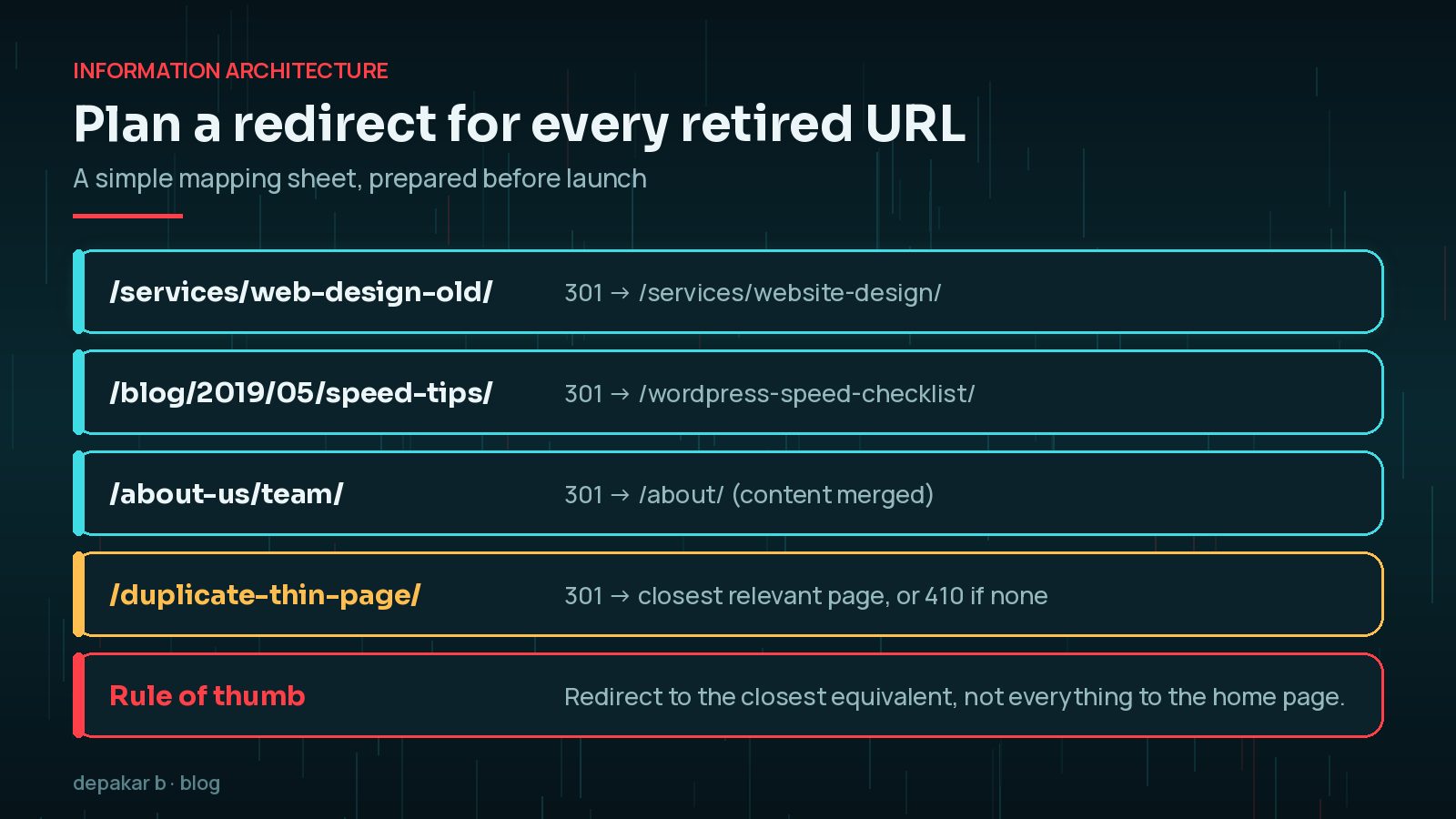
- Plan redirects for every retired URL
How Do You Decide What to Keep, Merge or Retire?
Go through the URL list from your audit and give every page one of three labels. Keep pages that earn traffic, links or enquiries, even if they need a rewrite. Merge pages that cover the same topic thinly, combining them into one stronger page and redirecting the others to it. Retire pages that are outdated, duplicated or no longer relevant to the business. Be cautious with pages that look unimportant but still receive links or long-tail search traffic; the data from the audit should make the decision, not how recently the page was edited.
How Should You Simplify the Navigation?
Start from what visitors come to do, not from your organisation chart. For most service businesses that means a handful of primary journeys, such as understanding a service, seeing proof it works, checking prices or process and getting in touch. Each journey should be reachable in a click or two from the main menu. Keep labels plain and familiar, and avoid burying important pages under vague headings like “Solutions” or “Resources” if visitors would not look for them there.
How Do You Plan Redirects for a Revamp?
Start with a spreadsheet: every old URL in one column and its new destination in the next. Google's site move guidance recommends preparing exactly this kind of mapping from current URLs to new ones and using permanent server-side redirects. Point each old page at its closest equivalent. Redirecting everything to the home page is tempting, but it is unhelpful to visitors and loses the relevance of the original page.
Google also advises keeping redirects in place for as long as possible, generally at least a year. In practice, there is little reason to remove them at all. If you are changing platforms rather than just redesigning, my comparison of leaving WordPress for Astro or Next.js covers the extra migration questions.
Build and content migration
Rebuild templates, then migrate cleaned content - not messy page-builder leftovers by default.
- Reusable sections over one-off layouts
- Mobile-first QA
- Preserve meaningful headings and internal links
Copying old content across as-is often brings the old problems with it: nested page-builder shortcodes, inline styles, oversized images and broken links. Treat migration as an editing job. Keep the copy and headings that rank and convert, tidy the markup, re-export images at sensible sizes and update internal links to the new URLs so they do not depend on redirects. Build a small set of reusable sections, so future pages stay consistent without a developer for every change. A repeatable build process, like the one in a WordPress development process that scales, makes this much easier.
What Should You Test Before Launch?
Test on real phones as well as desktop browsers. Submit every form and confirm the messages arrive where they should, including CRM and email integrations. Check checkout or booking flows end to end. Compare Core Web Vitals on the new templates with the baseline from the old site, using the WordPress speed optimisation checklist. Finally, crawl the staging site to catch broken links, missing titles and accidental duplicates before visitors and search engines see them.
It also helps to agree a short freeze on content changes on the old site during the final week. Every post, product or page added to the old site after content migration starts needs to be copied across again, and those late additions are easily missed. A shared list of late changes, checked off on launch day, avoids that problem.
SEO-safe launch
Canonicals, sitemap, analytics, and 301s are launch tasks - not week-two tasks.
- Test redirects
- Submit updated sitemap
- Compare Core Web Vitals before/after
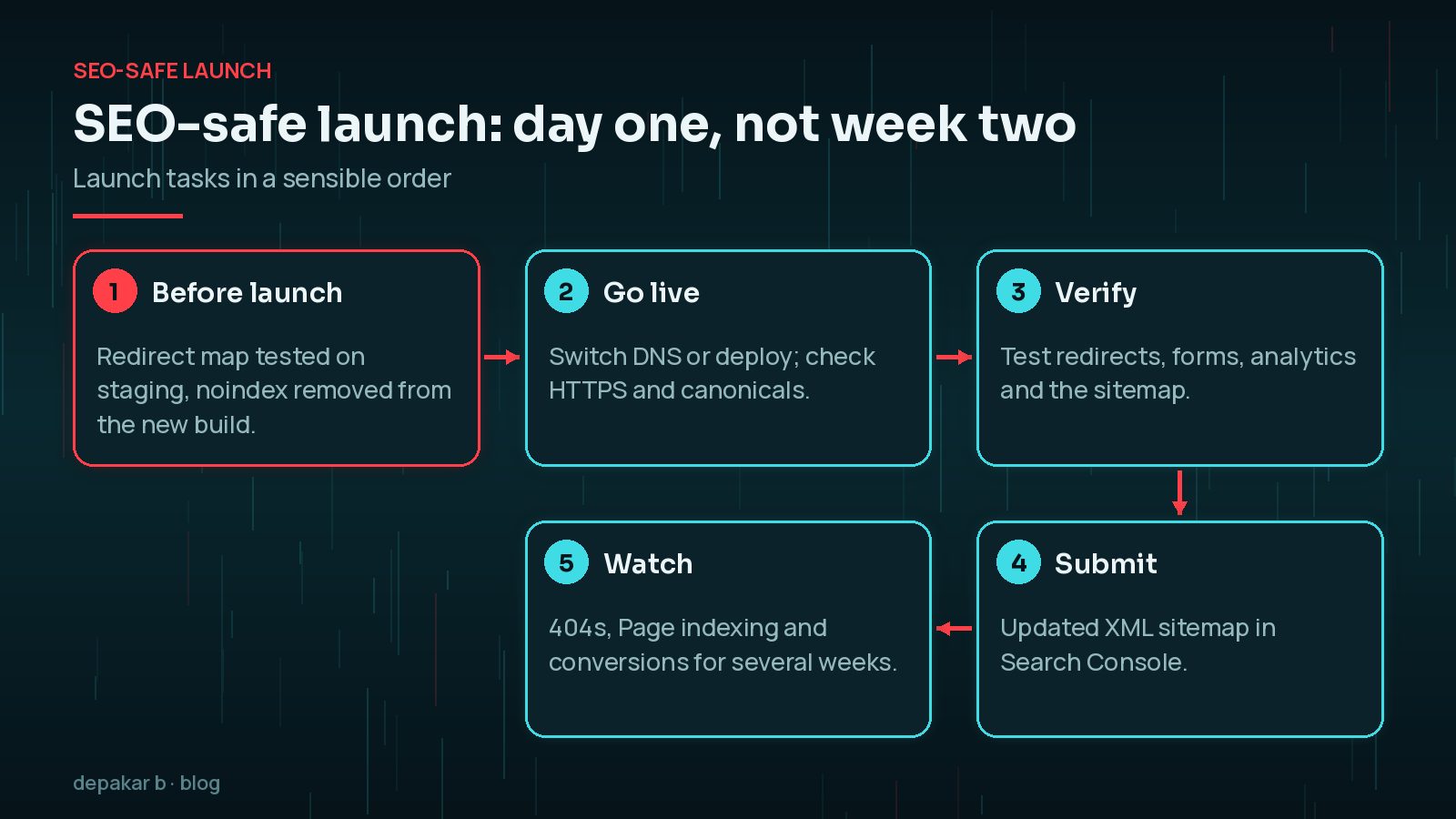
On launch day, test a sample of redirects from your mapping sheet, especially the top landing pages. Check that canonical tags point to the new URLs, the robots setting allows indexing and analytics is recording visits. Then submit the updated sitemap in Search Console. The WordPress technical SEO checklist covers these page-level checks in more detail.

Post-launch iteration
Watch Search Console for 404 spikes and conversion paths for friction.
- See SEO improvement
- Pair with speed work if needed
Is It Normal for Rankings to Change After a Revamp?
Some movement is normal. Google's site move documentation says to expect temporary ranking fluctuations during a significant change while its systems recrawl and reprocess the site. What you want to see is things settling over the following weeks. Watch the Page indexing report for new 404s and redirect errors, compare landing-page traffic with the old site, and keep an eye on enquiries and sales. If a page that used to perform well has dropped sharply, check its redirect, content and internal links before assuming it is an algorithm issue.
Do not forget the links you control outside the website. Update URLs in your business listings, social media profiles, email signatures, newsletter templates and any paid campaigns, so they point straight to the new pages rather than relying on redirects. Ask partners who link to important retired pages to update their links where it is practical. These small jobs are easy to put off, but together they keep visitors and search signals flowing to the right places.
Frequently Asked Questions
Will a website revamp hurt my SEO?
It can if URLs change without redirects or valuable content is removed. With a full URL map, tested 301 redirects and preserved content, most sites settle after some temporary fluctuation.
How long should I keep redirects after a redesign?
Google's site move guidance says to keep redirects for as long as possible, generally at least one year. Many sites simply keep them permanently.
Should I redirect old pages to the home page?
Only if there is genuinely no relevant replacement. Redirect each old URL to its closest equivalent, or return a 404 or 410 for content that is gone for good.
Should I keep my page builder during a revamp?
It depends on your team and site. A revamp is a good moment to rebuild templates with reusable sections and remove leftover page-builder markup that slows pages down.
What should I check in the first weeks after launch?
Watch Search Console for new 404s and indexing issues, compare landing-page traffic with the old site, and test forms and conversions regularly.
Final Thoughts
A successful WordPress website revamp is planned around what already works. Audit before you design, map every retired URL to a sensible new home, migrate cleaned content rather than old clutter, and treat redirects, sitemaps and analytics as launch-day tasks. Then watch the data for a few weeks and fix problems while they are small.
Need help applying this?
Planning a rebuild? Explore website revamp.
Official References
Sources checked on 29 October 2026:
- Google Search Central: Site moves and migrations
- Google Search Central: Redirects and Google Search
- Google Search Central: What is a sitemap
- Search Console Help: Page indexing report
- WordPress Advanced Administration: Migrating WordPress
Related service: Website revamp · Contact · All articles