
Good internal linking in WordPress does two jobs at once. It helps visitors find the next useful page, and it helps search engines discover your pages and understand which ones matter most. Unlike backlinks, internal links are entirely in your hands, which makes them one of the most practical SEO improvements a small business can make.
This guide covers why internal links still matter, how to group content into topic clusters, how to link blog posts to service pages, how to write anchor text, and how to find and fix orphan pages.
Why internal linking in WordPress still matters
Google's SEO starter guide notes that the vast majority of new pages Google finds every day are discovered through links. Its link best practices also say every page you care about should have a link from at least one other page on your site.
Links also carry meaning. Google's guidance on ecommerce site structure explains that it can use the number of links needed to reach a page, and the number of links pointing to it, to infer how important that page is relative to the rest of the site. A service page buried four clicks deep with two links pointing at it sends a weak signal.
- Discovery: links help search engines find new and updated pages.
- Context: anchor text tells people and search engines what the linked page is about.
- Priority: pages with more relevant internal links tend to look more important.
- Visitors: links guide readers from an answer to the service that solves their problem.
Links only count if they can be crawled. Google recommends standard <a href> links; buttons that navigate with JavaScript alone may not be followed. For the wider picture, see technical SEO improvements that matter.
Topic clusters for a service business
A topic cluster is a group of pages on one subject. For a service business, the service page sits at the centre and blog posts answering related questions sit around it, all linked together.

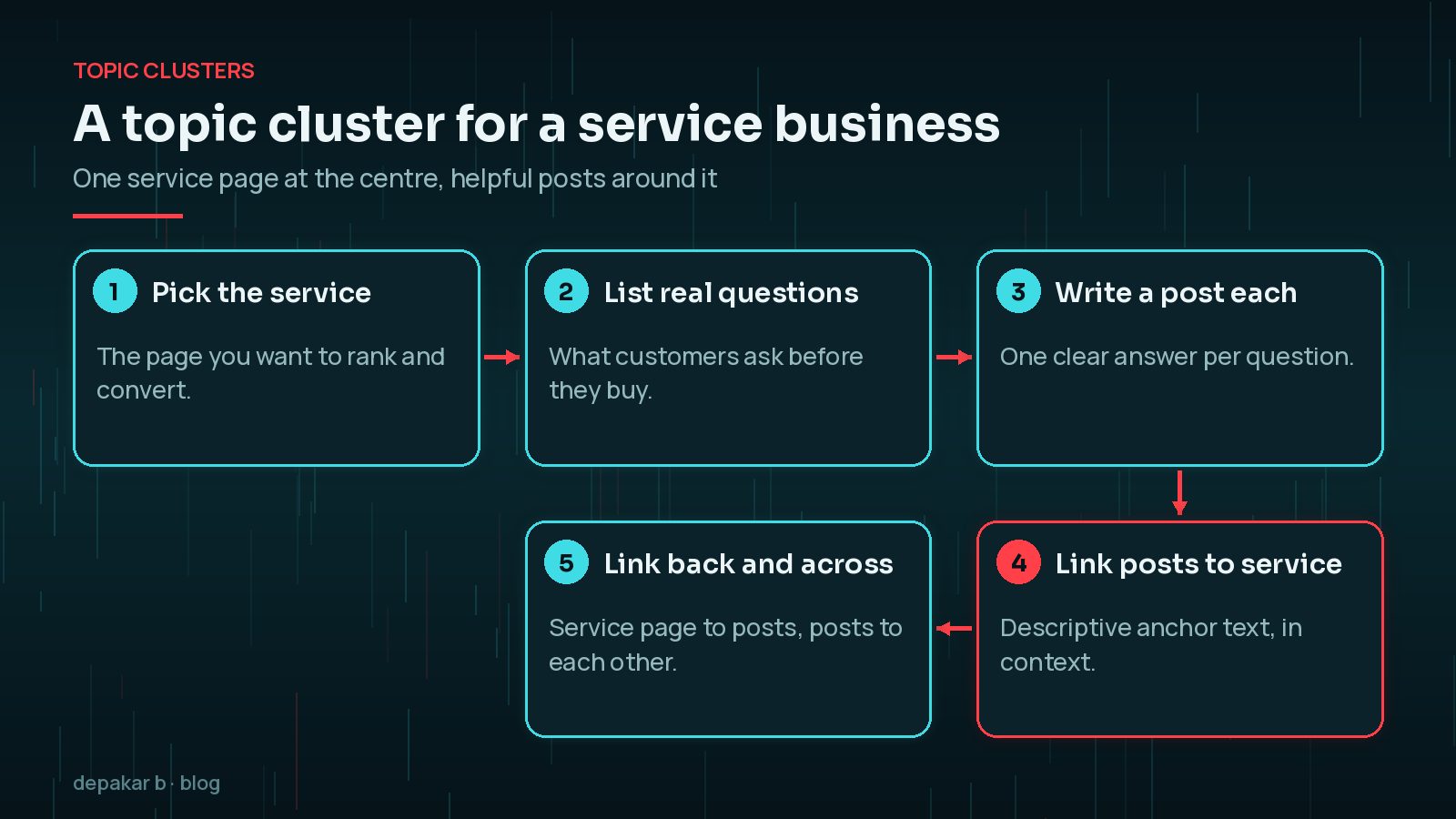
For example, a web developer offering hacked-site recovery might link posts on signs of a hack, cleaning a hacked site and removing Google warnings to the recovery service page, and link those posts to each other where it helps the reader.
Linking blog posts to service pages
Many small business blogs never link to the services that pay the bills. Each post should point readers to the most relevant service, in context, where it naturally fits.
- Link from the paragraph where the reader is most likely to want help, not only in the footer.
- Link the service page back to the most useful posts, for example in a short “related guides” section.
- Keep it relevant: a post about site speed should link to a speed service, not to every service you offer.
Anchor text: natural, not stuffed
Anchor text is the clickable text of a link. Google says good anchor text is descriptive, reasonably concise and relevant to both pages. It warns against generic text such as “click here” and against cramming keywords in, which can fall under its spam policies on keyword stuffing.
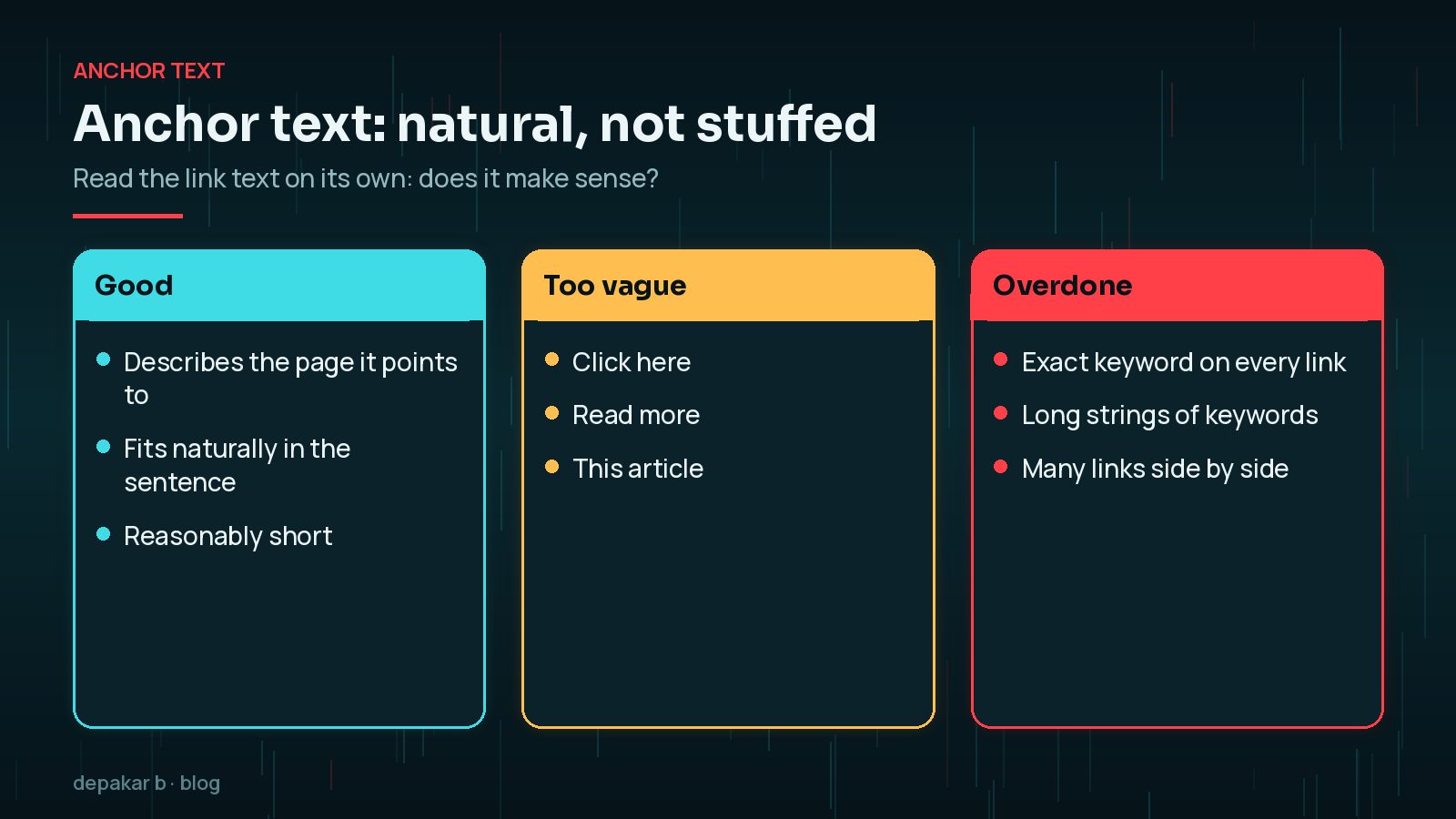
A simple test from Google's guidance: read only the link text. If you cannot tell what the page is about, make it more descriptive. Also avoid placing several links right next to each other, because readers lose the context of each one. For images used as links, the image alt text acts as the anchor text.
Finding orphan pages
An orphan page is a page with no internal links pointing to it. Visitors cannot reach it by browsing, and search engines may only find it through your sitemap, if at all.

- Crawl your site with a site-crawling tool and export the list of pages it found by following links.
- Compare that list with the URLs in your XML sitemap. Pages in the sitemap but not in the crawl are likely orphans.
- Link each useful orphan from at least one relevant page, or remove or redirect it if it has no value.
Orphans and weak internal links are a common reason pages stay out of the index; see “Crawled - currently not indexed” in WordPress.
Navigation, breadcrumbs and related posts
Site-wide links set the overall structure. Keep the main menu focused on your key services and categories rather than every page. Breadcrumbs show where a page sits in the hierarchy and add useful links back to category pages; many SEO plugins and block themes can add them.
Category and tag archives also create internal links automatically. Keep categories few and meaningful, and avoid creating dozens of tags used only once, which produce thin archive pages that dilute your structure rather than strengthen it.
Automatic “related posts” blocks are helpful but not a replacement for links in the body text, which carry more context. Check what any related-posts plugin outputs, and make sure it uses normal crawlable links.
An internal link audit routine
Internal links decay over time as pages are added, renamed and removed. A short routine every few months keeps things tidy.
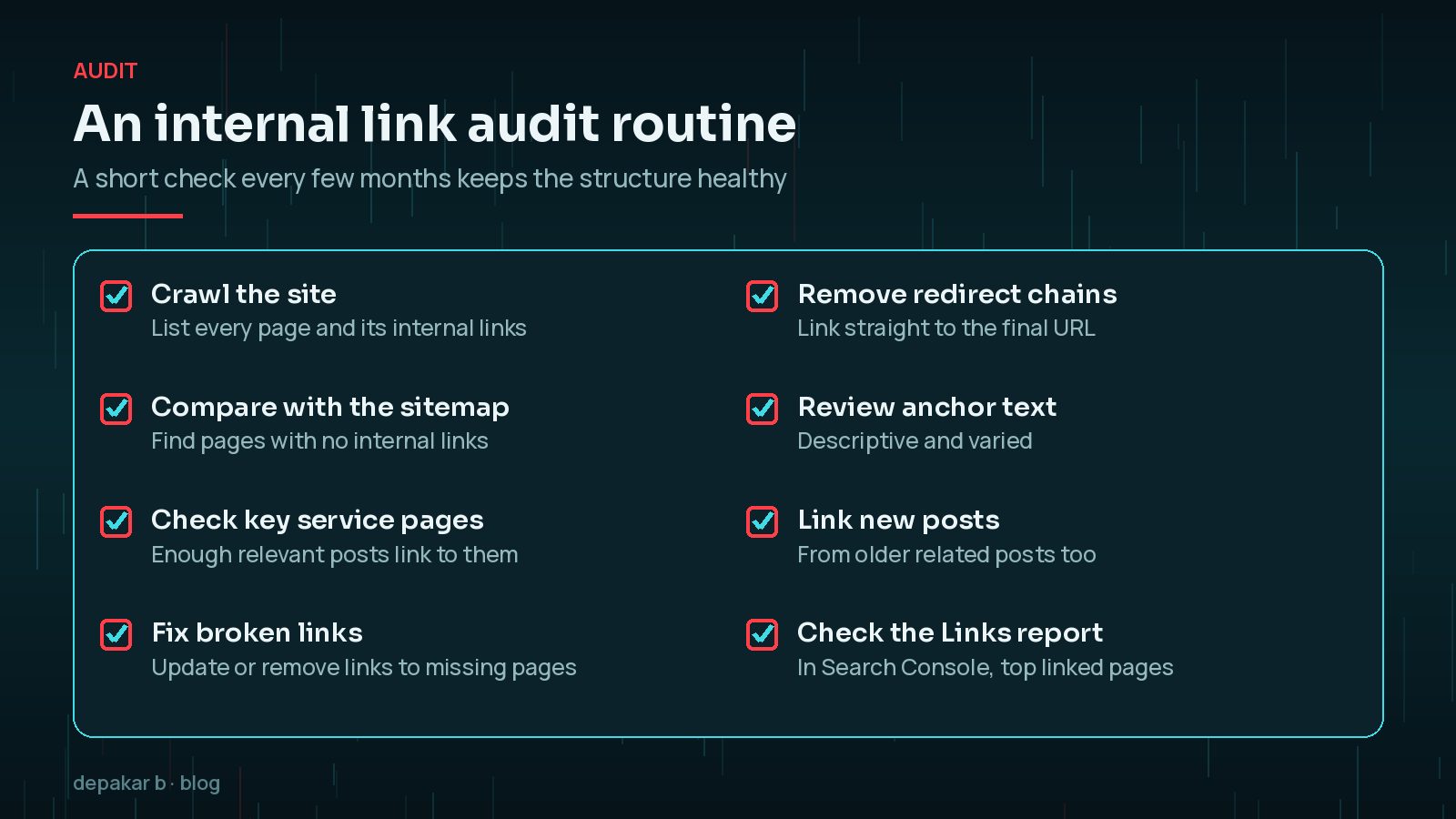
Search Console's Links report shows a sample of your internal links, including your most-linked pages, which is a quick way to check whether your key service pages are getting the attention they deserve. When you publish a new post, go back to two or three older related posts and link to it too. For how links fit with AI search, read my SEO, AEO and GEO guide.
Frequently Asked Questions
How many internal links should a blog post have?
Google says there is no magic ideal number. Link where it genuinely helps the reader, usually a few contextual links to related posts and the most relevant service page.
Do internal links help SEO?
Yes. They help search engines discover pages, understand what they are about through anchor text, and judge which pages matter most on your site.
Should I use the exact keyword as anchor text?
Use descriptive text that fits the sentence. Repeating the exact keyword on every link looks unnatural, and Google warns against keyword stuffing.
What is an orphan page?
A page with no internal links pointing to it. Visitors cannot reach it by browsing and search engines may struggle to find it. Link it from a relevant page or remove it.
Are related posts plugins enough for internal linking?
They help, but links within the body text carry more context. Use both, and check that any plugin outputs normal crawlable links.
Final Thoughts
Internal linking in WordPress does not need special tools or tricks. Group content around your services, link posts to the service they support with clear anchor text, make sure no useful page is an orphan, and check the structure every few months. Small, steady improvements add up. If you would like help planning your site structure, my SEO improvement service includes an internal linking review.
Official References
Sources checked on 29 October 2026: