
A redesign changes more than colours and layouts. It usually changes templates, navigation, page copy, internal links and often URLs. Each of those affects how search engines understand the site. Good website redesign SEO is mostly about knowing exactly what you have before you start and making sure every valuable piece survives the move.
Why Do Redesigns Lose Rankings?
In my experience, ranking drops after a relaunch nearly always come from one of these:
- Changed URLs without redirects. Old pages return 404 errors, so the links and history attached to them are lost.
- Removed or thinned content. A "cleaner" design cuts the text, FAQs or service details that pages were ranking for.
- Lost internal links. A new menu or footer no longer links to important pages.
- Changed titles and headings that previously matched what people search for.
- Indexing blocks carried over from staging, such as a
noindextag or a robots.txt disallow. - Slower templates, with heavy sliders, scripts or images that hurt Core Web Vitals.
If you are still deciding whether a redesign is worth it, my article on the signs you need a website redesign may help.
What to Benchmark Before You Touch Anything
You cannot protect what you have not measured. Before any design work starts, export a snapshot of the current site.
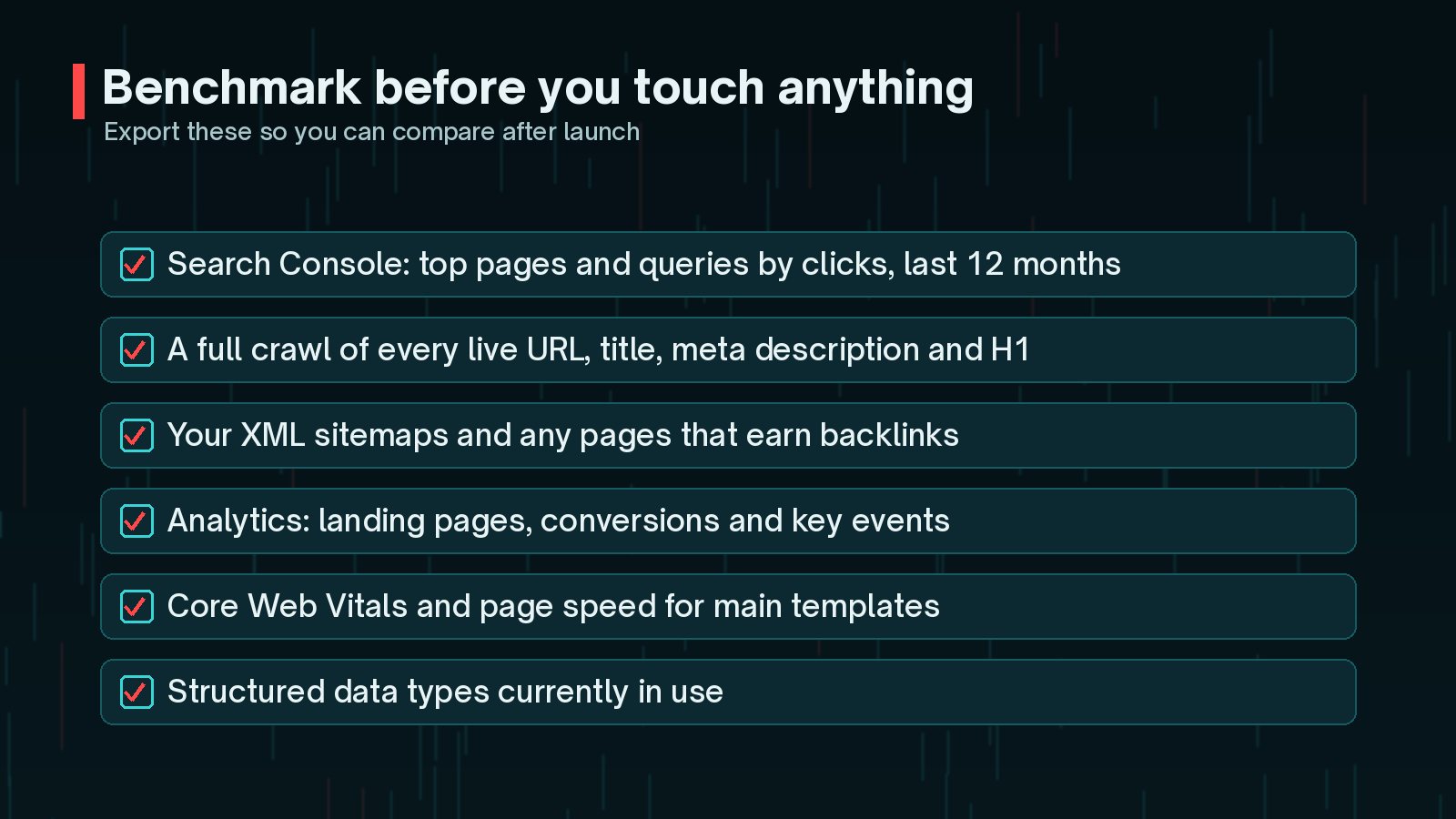
- Search Console Performance: top pages and queries by clicks for the last 12 months.
- A full crawl of every live URL with its title, meta description, H1 and status code, using a crawler such as Screaming Frog or Sitebulb.
- XML sitemaps and any pages that earn external links.
- Analytics: landing pages, conversions and key events.
- Core Web Vitals for your main templates.
- Structured data currently in use, such as LocalBusiness, Product or FAQ markup.
Mark your most valuable pages clearly. These are the ones that need the most care in the new design.
How to Build a URL and Redirect Map
Google's site move guide is clear that preparing a URL mapping is central to a successful move. A redirect map is a simple spreadsheet: every old URL in one column, its new URL in the next and a decision for each.
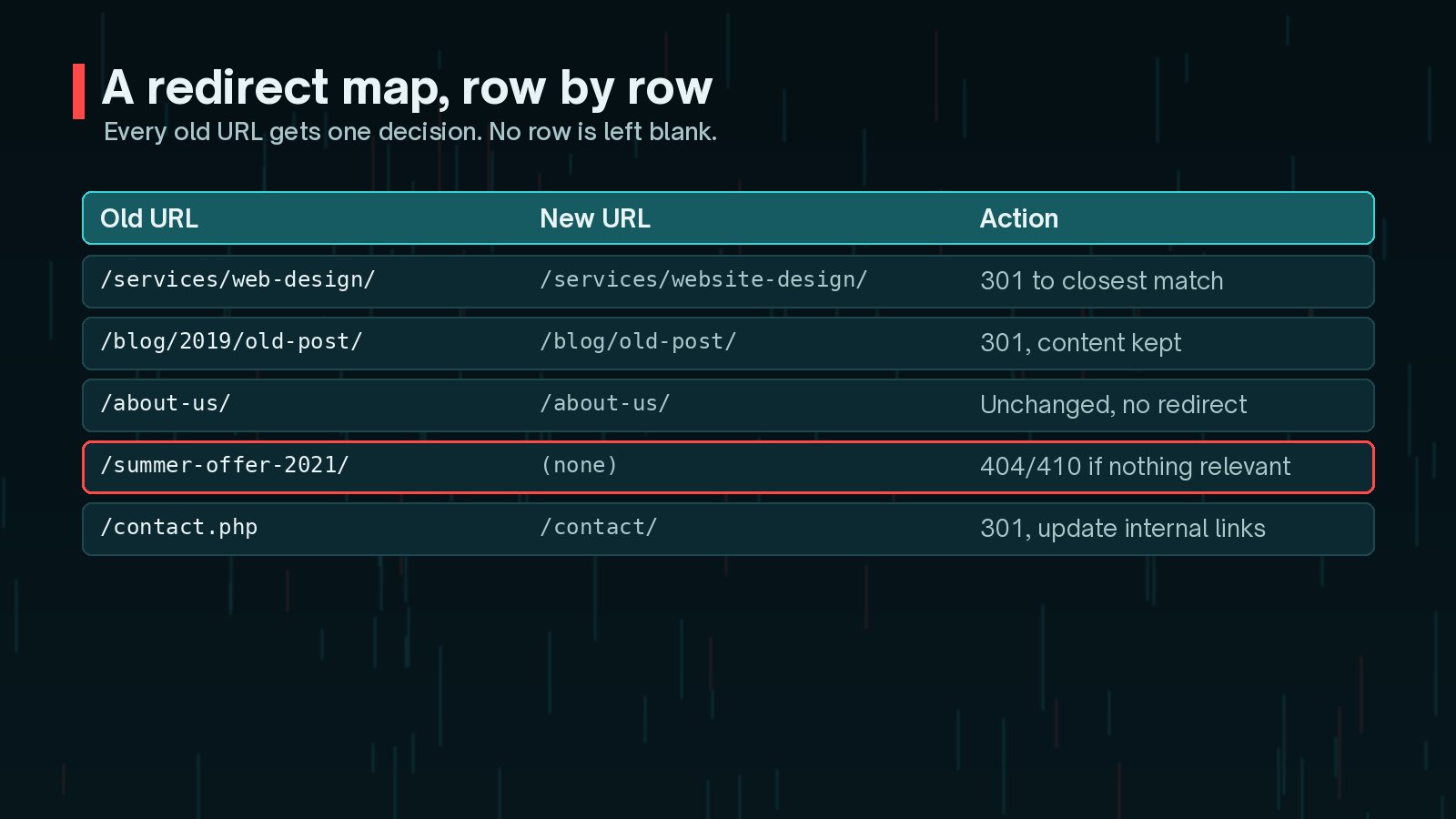
- Unchanged: the URL stays the same. The best option whenever it is possible.
- 301 to the closest match: use permanent server-side redirects (301 or 308) for anything that moves.
- Consolidated: several old pages merge into one new page, and all of them redirect there.
- Retired: nothing relevant exists any more, so the URL returns a 404 or 410.
Google also advises avoiding redirect chains, ideally keeping them to no more than three hops, and warns against sending many old URLs to one irrelevant page such as the homepage. If you are also changing host at the same time, plan that as a separate step, as described in my guide to moving WordPress to a new host.

Keeping Content, Titles and Internal Links That Rank
Design teams often want less text. Search engines and customers often need more. Find a balance that keeps what works.
- Keep the substance of ranking pages: the explanations, prices, FAQs and details that match search intent. Redesign the presentation, not the meaning.
- Carry over titles, meta descriptions and H1s for top pages, and improve them only where the data supports it.
- Rebuild internal links. Make sure important pages are still linked from menus, hubs and related content, and update links to point directly at new URLs rather than through redirects.
- Keep structured data and image alt text in the new templates.
My WordPress website revamp checklist covers the design and build side alongside these SEO steps.
Website Redesign SEO Mistakes on Launch Day
Staging sites should be hidden from search engines. The danger is that the same block travels to the live site at launch.

Common launch-day mistakes:
- Leaving Settings > Reading > "Discourage search engines from indexing this site" ticked in WordPress.
- A
noindexmeta tag orX-Robots-Tagheader left on templates. - A robots.txt file that disallows the whole site.
- Password protection left on, or canonical tags pointing at the staging domain.
- Redirects written but not switched on.
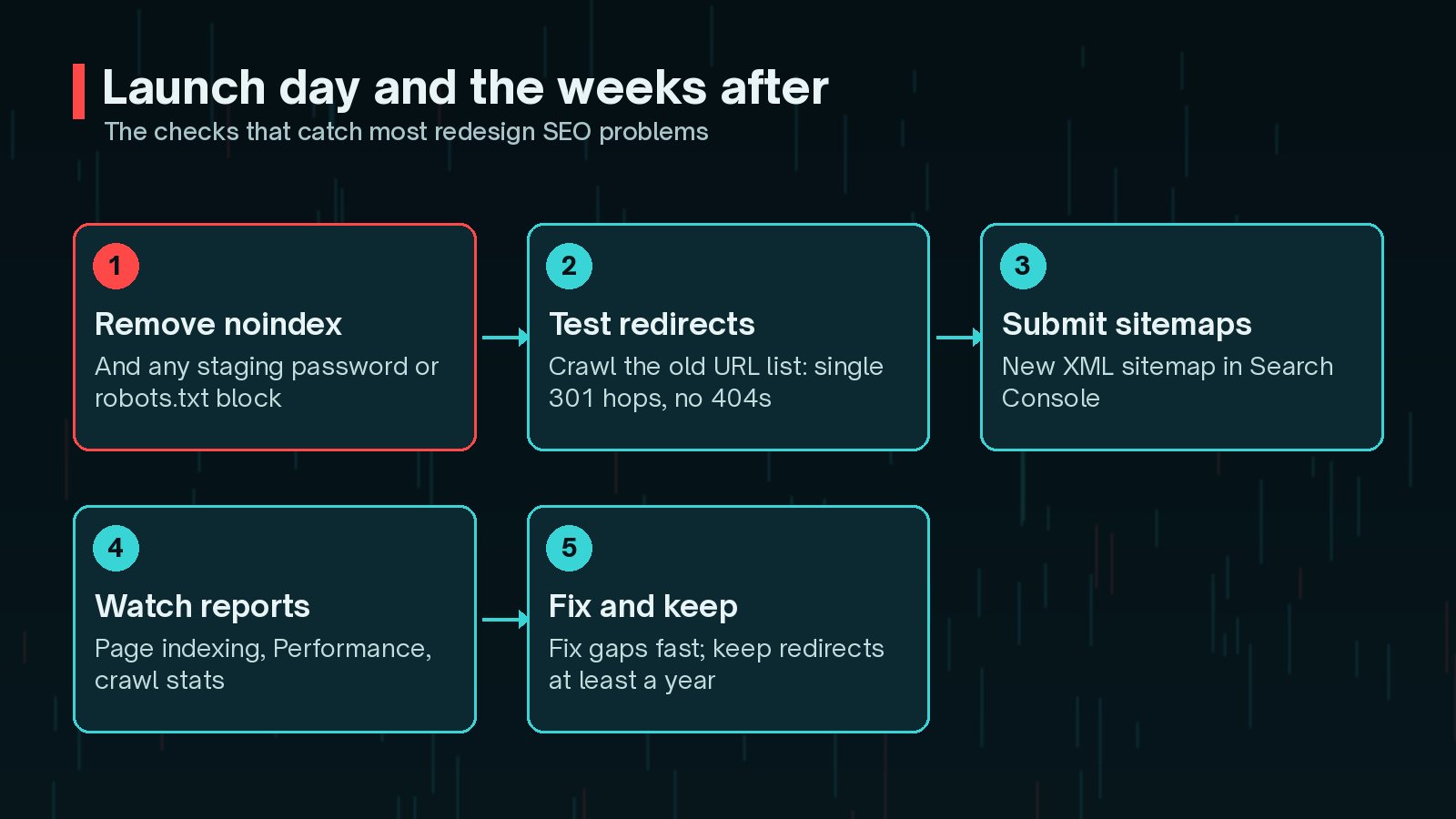
Test your old URL list, not just the new site. After launch, crawl the list of old URLs from your benchmark. Every one should return a single 301 to the right page, or 200 if unchanged. Any 404 on a page that used to get traffic needs fixing the same day.
What to Check in Search Console After Launch
Google's site move guide recommends monitoring traffic closely after a move. In Search Console:
- Submit the new XML sitemap under Sitemaps.
- Use URL Inspection on key pages to confirm Google can fetch them and sees the right canonical.
- Watch the Page indexing report for spikes in "Not found (404)", "Excluded by noindex tag" or redirect errors.
- Compare Performance week by week against your benchmark, by page and by query.
- Check crawl stats for server errors if the new site runs on a different setup.
My WordPress technical SEO checklist covers the wider technical health checks worth running a month after launch.
How Long Should a Dip Last?
Some movement is normal. Google says visibility may fluctuate temporarily during a site move and that rankings settle down over time. For a small to medium-sized site, Google's guide says it can take a few weeks for most pages to move, and longer for larger sites.
A useful rule of thumb:
- Small wobbles for a few weeks, with pages being reindexed, are expected.
- A sharp, sustained drop on specific pages points to a fixable problem: a missing redirect, lost content or an indexing block.
- A slow slide across the site after a month or two suggests weaker content, internal linking or performance in the new templates.
Keep the redirects in place for at least a year, as Google recommends. In practice, I leave them indefinitely.
Frequently Asked Questions
Will a website redesign hurt my SEO?
It does not have to. Google's own site move guidance says rankings may fluctuate temporarily during a move, then settle. Big, lasting drops usually come from preventable mistakes: missing redirects, removed content, a leftover noindex or broken internal links.
Should I keep the same URLs when redesigning?
If you can, yes. Keeping URLs unchanged removes the biggest risk entirely. Change URLs only when there is a clear benefit, such as fixing a messy structure, and then redirect every old URL to its closest new equivalent.
Can I redirect all old pages to the homepage?
No. Google warns that redirecting many old URLs to one irrelevant page, such as the homepage, can confuse users and may be treated as a soft 404. Redirect each URL to the most relevant new page, or let genuinely retired pages return a 404 or 410.
How long should I keep 301 redirects after a redesign?
Google's site move guidance recommends keeping redirects for as long as possible, generally at least one year. In practice, there is little reason to ever remove them.
Do I need the Change of Address tool for a redesign?
Only if you are moving to a new domain. For a redesign on the same domain, even with new URLs, you rely on redirects, updated internal links and a fresh sitemap instead.
Final Thoughts
Website redesign SEO is not about avoiding change. It is about change with a plan: benchmark first, map every URL, keep the content and links that earn rankings, remove staging blocks at launch and watch the right reports afterwards. Do that and a redesign can grow search traffic rather than cost you it.
If you are planning a revamp and want the SEO side handled from the first wireframe to the post-launch checks, my website revamp service includes all of the steps above.
Official References
Sources checked on 29 October 2026: