
Time to First Byte, or TTFB, measures how long it takes from the moment a visitor requests a page until the first byte of the response arrives. On WordPress it is mostly the time your server spends running PHP, querying the database and building the HTML. If you want to reduce TTFB, that is where most of the work happens.
What Is TTFB and What Counts as Good?
According to web.dev, TTFB covers several phases: redirect time, service worker start-up, DNS lookup, connection and TLS negotiation, and the request itself up to the first byte of the response. On a typical WordPress page, the server-side part is usually the biggest slice.
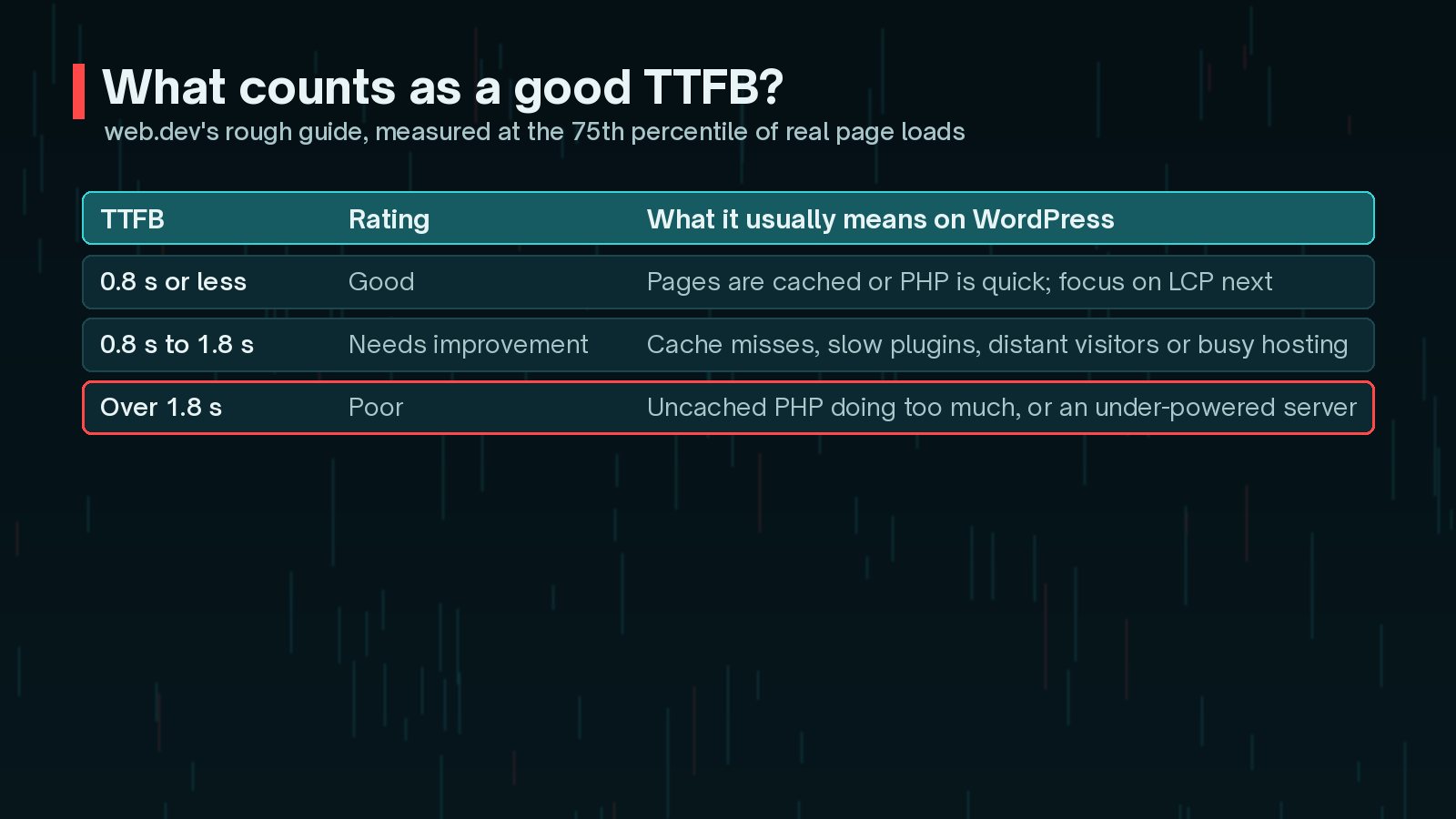
web.dev's rough guide is a TTFB of 0.8 seconds or less, with anything over 1.8 seconds counted as poor. TTFB is not a Core Web Vital, but it comes before First Contentful Paint and Largest Contentful Paint. If your LCP is struggling, check TTFB first.
How Do I Measure TTFB Properly (Lab vs Field)?
You need both kinds of data, because they tell you different things.
- Field data comes from real visitors. PageSpeed Insights shows TTFB from the Chrome UX Report when your site has enough traffic. This includes redirects, distance and network conditions.
- Lab data comes from a single controlled test. It is great for before-and-after comparisons, but web.dev notes that lab tools often measure the final URL and miss redirect time.
A quick lab check from the command line:
curl -o /dev/null -s -w "TTFB: %{time_starttransfer}s\n" https://example.com/Run it several times, both for the homepage and for an important inner page. If the first run is slow and later runs are fast, you are seeing a cache warming up. If field TTFB is much worse than lab TTFB, look at redirects, visitor locations and logged-in traffic.
For deeper digging, web.dev recommends the Server-Timing response header, which lets your server report how long things like database work took. Some hosts and performance plugins add it for you.
Is My Hosting the Bottleneck?
web.dev's optimisation guide puts hosting first for a reason. If an uncached page takes a long time to generate even on a lean test install, no plugin will save you.

Signs the host is the limit:
- TTFB is high even on a simple page with caching bypassed and few plugins active.
- TTFB gets much worse at busy times of day.
- The server is a long way from most of your visitors.
- Your plan has no server-level caching, no object cache option and old PHP versions.
The WordPress optimisation handbook lists hosting type, server load, hardware and geographic distance as key performance factors. Moving from crowded shared hosting to a well-configured managed or VPS plan is often the single biggest TTFB win. If you do move, plan the migration carefully, test on the new server first and switch DNS only when it is ready.
How Page Caching Helps Reduce TTFB
Without page caching, every visit makes WordPress load core, the theme and every active plugin, run its database queries and assemble the HTML from scratch. A page cache stores the finished HTML and serves it directly on the next request.
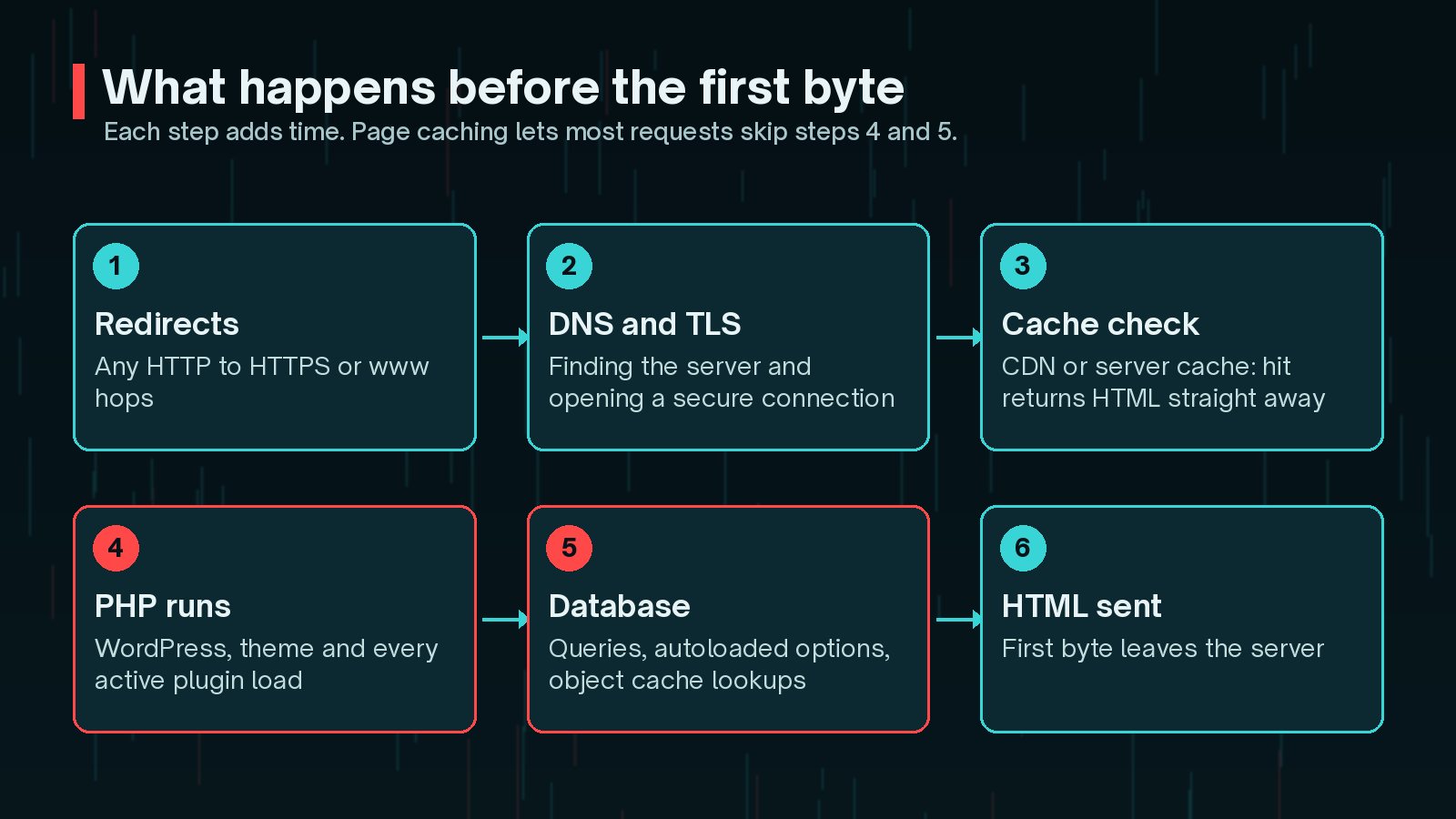
Options, roughly from fastest to simplest:
- Server or host-level caching, such as Nginx FastCGI cache, Varnish or a managed host's built-in cache.
- A CDN that caches HTML at the edge.
- A caching plugin that writes static HTML files.
After enabling caching, confirm it works. Check the response headers for a cache status such as HIT, and check Tools > Site Health, which reports on page caching and server response time. I explain the different layers in WordPress caching explained.

Remember who skips the cache. Logged-in users, shopping carts, checkouts and pages with query strings are often excluded. For membership and WooCommerce sites, the uncached TTFB matters just as much as the cached one.
PHP Version, OPcache and Object Cache
For requests that cannot be served from a page cache, make PHP and the database do less work.
- Run a supported PHP version. Newer versions usually perform better, and older ones stop getting security fixes. Check php.net's supported versions table before choosing.
- Make sure OPcache is enabled. It keeps compiled PHP in memory so files are not recompiled on every request. Most good hosts enable it by default, but it is worth confirming.
- Add a persistent object cache. The WordPress handbook explains that without one, options and other data are read from the database on every page view, which slows TTFB and can overwhelm the database during spikes. Redis or Memcached, plus a matching drop-in plugin, fixes this. Your host must support it.
Plugins and Database Queries That Slow the Server
Every active plugin runs code on every uncached request. A few heavy ones can add a lot of time.
- Install Query Monitor on a staging copy and load slow pages while logged in. It shows slow queries, duplicate queries, HTTP API calls and which plugin caused them.
- Look for plugins that make external API calls during page loads, such as social feeds, licence checks or currency rates. They should be cached or moved to background jobs.
- Check autoloaded options. The WordPress handbook suggests keeping them under about 800 KB, and Site Health warns when they grow too large. Old plugins often leave large autoloaded data behind.
- Clean up expired transients, old revisions and orphaned tables left by removed plugins.
My WordPress speed optimisation checklist covers front-end fixes once the server side is under control.
When a CDN Helps TTFB and When It Doesn't
A CDN helps TTFB in two ways: it puts a server physically closer to the visitor, cutting connection time, and it can serve cached HTML without touching your origin at all.
It helps much less when:
- It only caches static files, so HTML still comes from a slow origin.
- Most of your traffic is logged in or personalised.
- Your visitors are already close to your server and the real delay is PHP.
web.dev also recommends avoiding multiple redirects. A visitor who goes from http:// to https:// to www pays for each hop before the first byte arrives. Link straight to the final URL everywhere you can.
Frequently Asked Questions
Is TTFB a Core Web Vital?
No. Google's Core Web Vitals are LCP, INP and CLS. TTFB is a supporting metric, but because it comes before every other loading milestone, a slow TTFB makes a good LCP much harder to reach.
Why is my TTFB fast in tests but slow for real visitors?
Lab tests often hit a warm cache from a nearby location with no redirects. Real visitors may arrive through redirect chains, from far away, on slower networks or while logged in, which bypasses page caching. Compare field data with lab results to find which of these applies.
Will a caching plugin fix TTFB on its own?
For anonymous visitors on cacheable pages, often a lot. It will not help logged-in users, carts, checkouts or pages that are excluded from cache. Those need a faster server, a persistent object cache and leaner plugins.
Does a CDN reduce TTFB?
A CDN shortens the network distance and can serve cached HTML from an edge location close to the visitor, which can reduce TTFB considerably. If the CDN only caches images and scripts, the HTML still comes from your origin server and TTFB improves much less.
What TTFB should I aim for?
web.dev suggests most sites should aim for a TTFB of 0.8 seconds or less at the 75th percentile, and treats anything above 1.8 seconds as poor. It describes these as a rough guide rather than a hard rule.
Final Thoughts
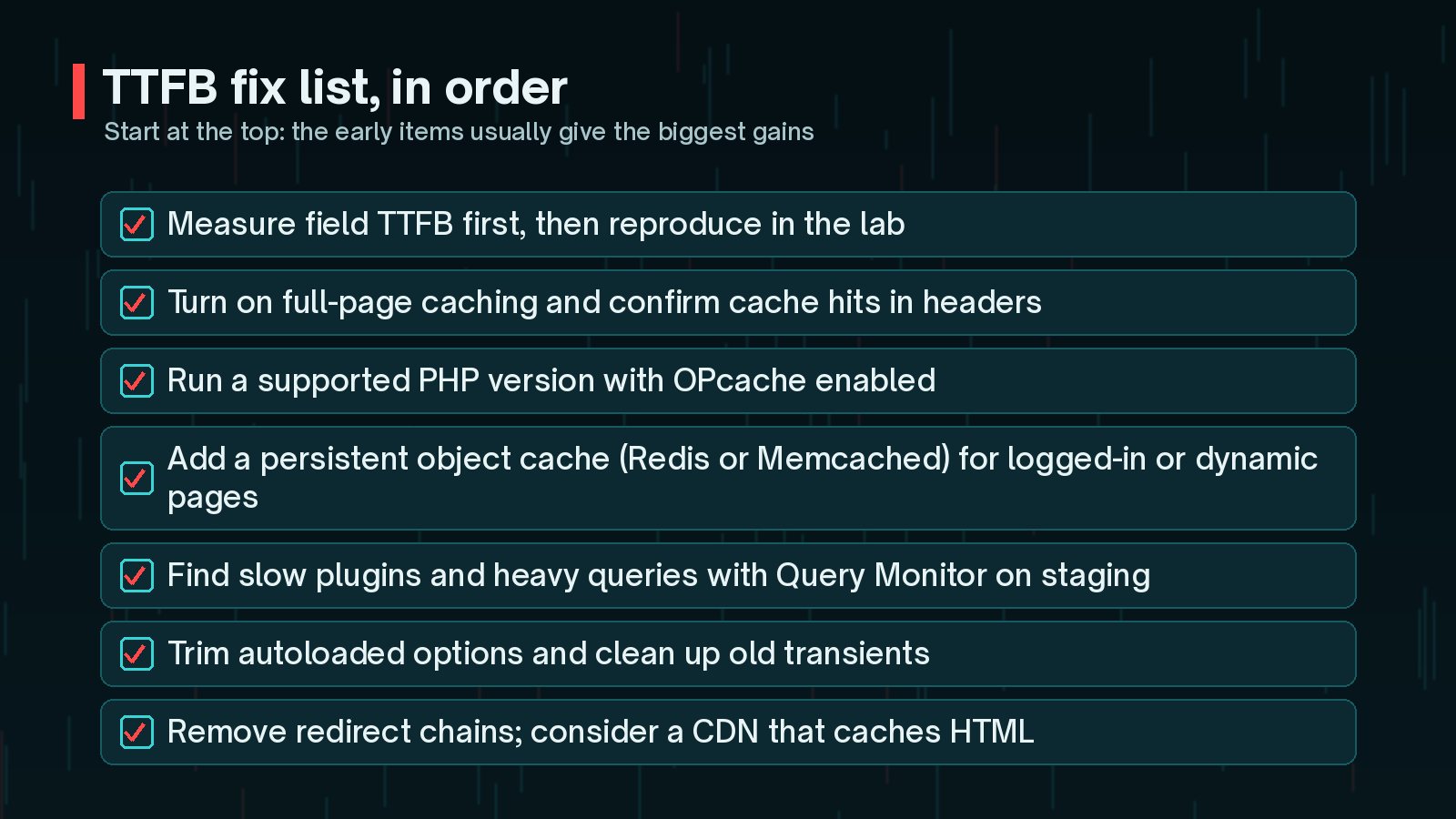
To reduce TTFB on WordPress, measure first, then work from the biggest lever to the smallest: hosting, page caching, PHP and object caching, then plugins and queries, and finally redirects and CDN setup. Recheck field data a few weeks after each change, because that is what your visitors actually experience.
For the bigger picture, start with my WordPress performance guide. If you would like someone to profile your site and fix the slow parts, that is what my speed and performance service does.
Official References
Sources checked on 29 October 2026: