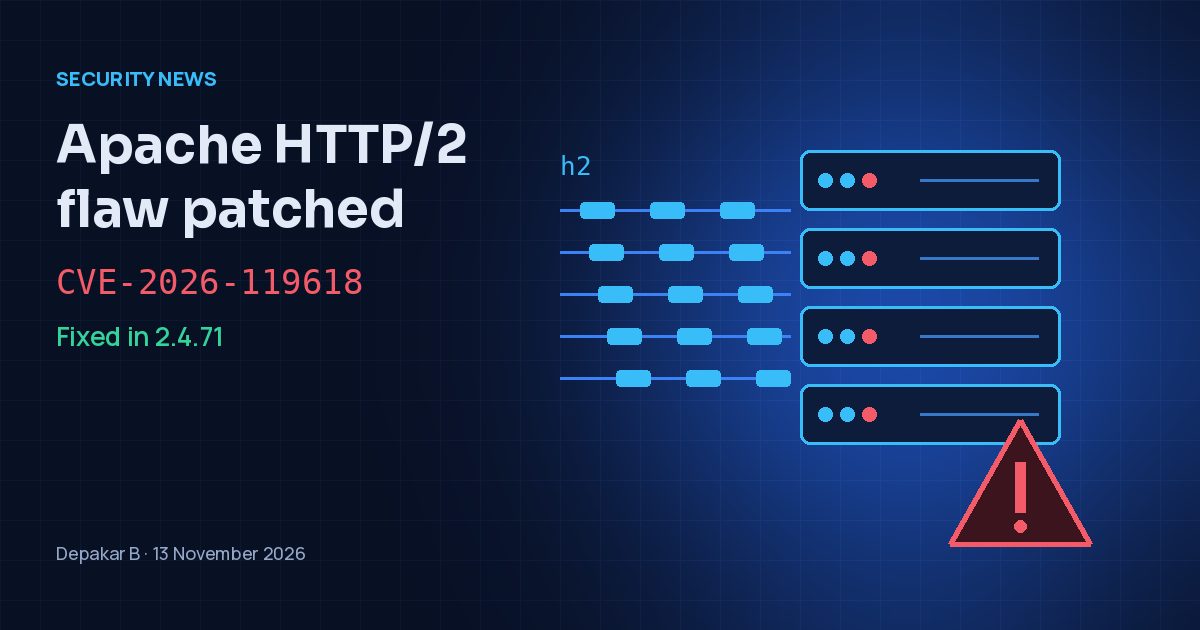
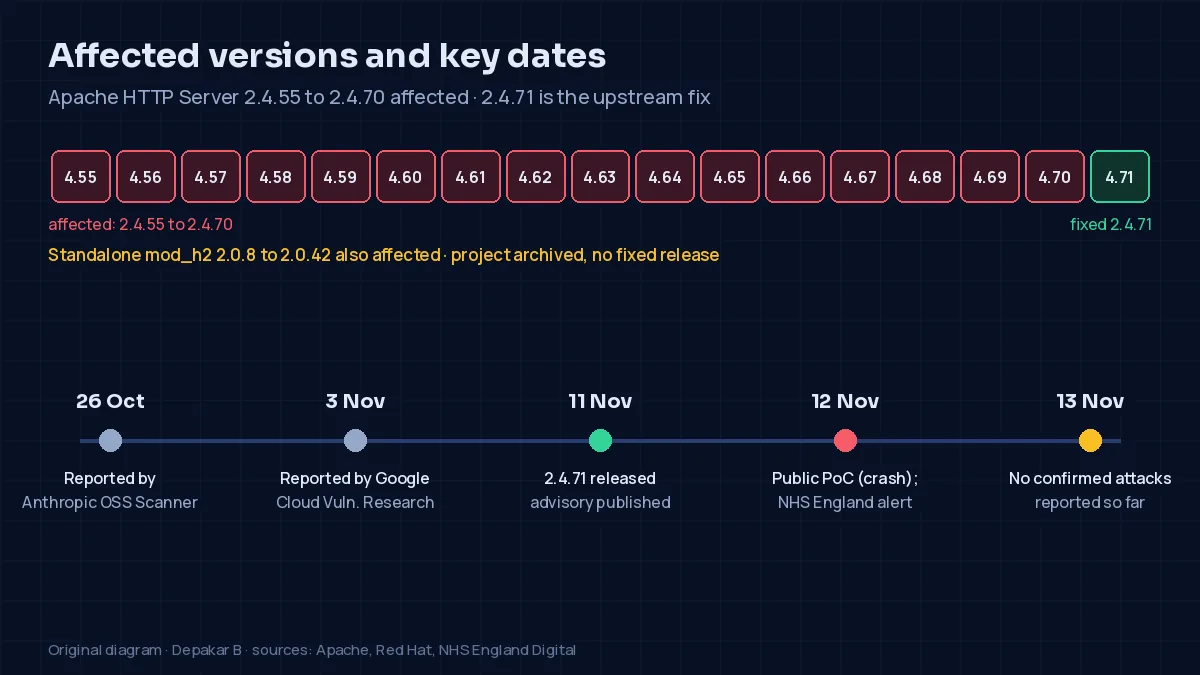
The Apache Software Foundation released Apache HTTP Server 2.4.71 on 11 November 2026 to fix CVE-2026-119618, a flaw in the mod_http2 module that Apache rates critical. Versions 2.4.55 to 2.4.70 are affected, but only on servers where HTTP/2 is switched on. Red Hat says an attacker could exploit it remotely without logging in. NHS England Digital reported on 12 November that proof-of-concept code is now public.
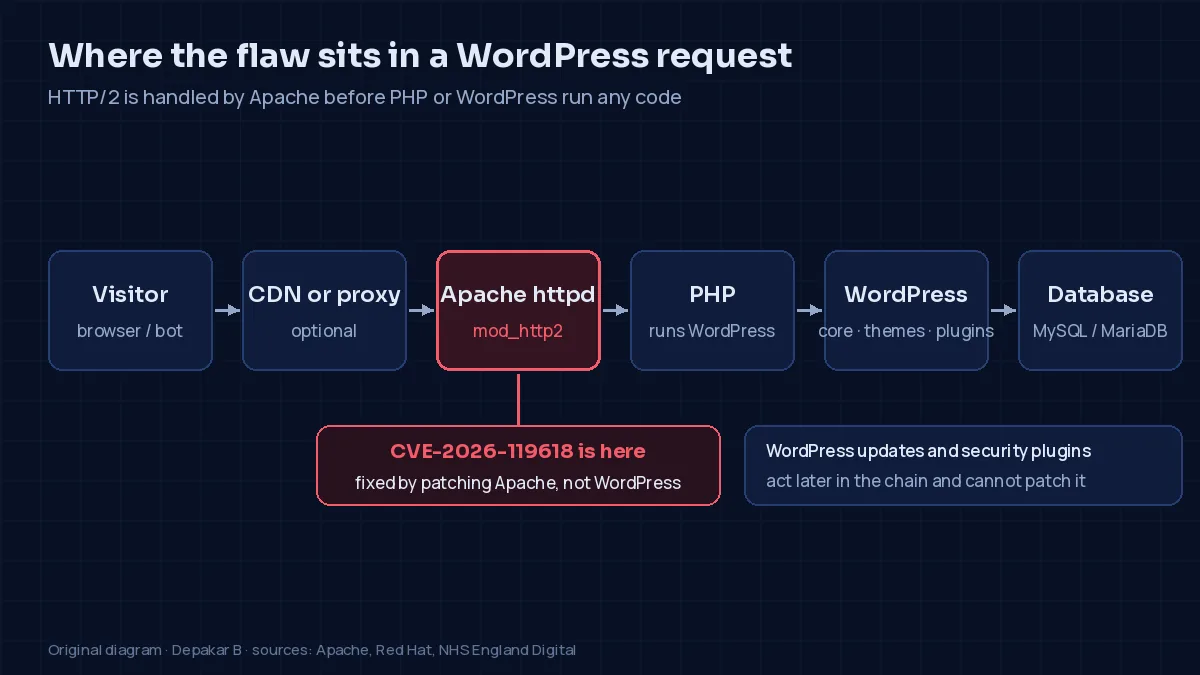
For WordPress site owners on Apache hosting, this is a server issue rather than a WordPress one. Updating WordPress, a theme or a security plugin will not fix it. The fix has to be installed by whoever manages the web server.
“Concurrent Execution using Shared Resource with Improper Synchronization vulnerability in Apache HTTP Server's mod_http2 in assign_headers() can lead to RCE.”
Apache HTTP Server security advisory, 11 November 2026
What is CVE-2026-119618?
CVE-2026-119618 is a race condition in the part of Apache that handles HTTP/2 connections. Red Hat explains that HTTP/2 lets a client send many requests at once over one connection, and Apache handles them on several threads. Because of the flaw, one thread can write into memory that belongs to another, which corrupts the server's internal memory.
Red Hat scores it 9.8 out of 10 (CVSS 3.1) and says a remote attacker "who can reach the web server could exploit this flaw to execute arbitrary commands on the server without any authentication". Any code would run with the privileges of the Apache server process. The CVE record lists Apache's own rating of "critical" but no NVD score yet.
Apache's advisory credits two independent finders. Anthropic's OSS Scanner reported the flaw on 26 October, and Anthony Weems and Simon Scannell of Google Cloud Vulnerability Research reported it on 3 November. Apache published the fix and announced the flaw on the oss-security mailing list on 11 November.
Which versions are affected?
| Component | Affected versions | Fix |
|---|---|---|
| Apache HTTP Server | 2.4.55 to 2.4.70 | 2.4.71 (released 11 November 2026) |
Standalone mod_h2 from GitHub | 2.0.8 to 2.0.42 | No fixed release. NHS England says the project was archived in June 2026 and advises moving to the HTTP/2 support built into Apache. |
Linux distributions and hosting control panels ship their own builds and often add security fixes without moving to the upstream version number. Red Hat, for example, has fixed Red Hat Enterprise Linux 9 and 10. It rates the flaw Important rather than Critical on those releases because their packages give each HTTP/2 stream its own memory allocator, which makes an attack much harder. Red Hat says Red Hat Enterprise Linux 8 and earlier do not contain the affected code. A version number on its own therefore does not show whether a server is safe. Check your vendor's advisory for the package that contains the fix.
Does every Apache-based WordPress site have this vulnerability?
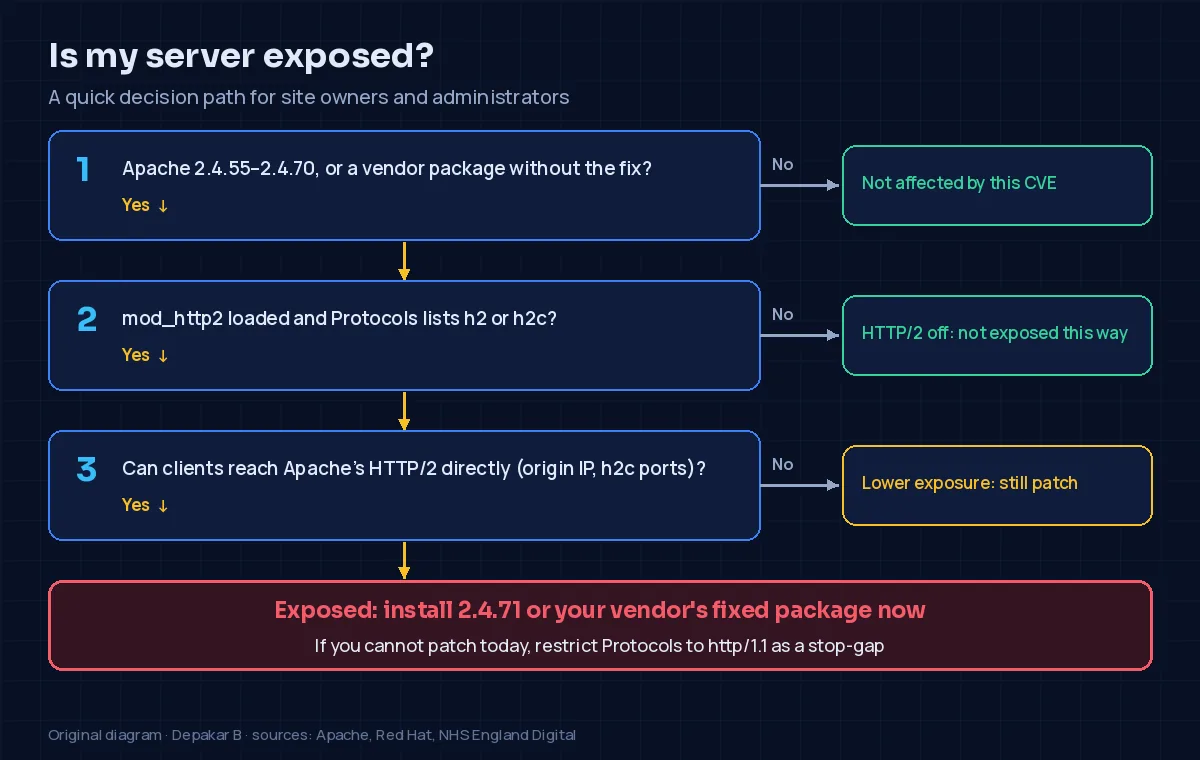
No. The flaw is only reachable over HTTP/2. In Apache's own default configuration HTTP/2 is off. Its documentation for the Protocols directive says, "By default, only the http/1.1 protocol (which includes the compatibility with 1.0 and 0.9 clients) is allowed." To turn HTTP/2 on, an administrator loads mod_http2 and adds h2 (HTTP/2 over TLS) or h2c (HTTP/2 over plain TCP) to Protocols. Some hosting stacks and control panels switch it on, so don't assume your host uses the default.
“Only servers that have HTTP/2 enabled are affected; servers configured to serve only HTTP/1.1 are not vulnerable.”
Red Hat, CVE-2026-119618
A CDN, reverse proxy or load balancer in front of Apache changes things. If it accepts HTTP/2 from visitors but talks to Apache over HTTP/1.1, public HTTP/2 support does not mean the Apache origin is exposed. It is still worth checking whether the origin can be reached directly, for example on its own IP address or an internal port with h2c enabled.
What is known about exploitation so far
Status as of 13 November 2026. The reports so far differ, so here is what each source says.
- Red Hat says "public research has demonstrated a reliable exploit against a default-configured server with the mod_http2 module enabled". SecurityWeek and The Hacker News note that Red Hat does not name or link that research.
- Wiz wrote on 11 November that "no exploit is available and there are no reports of exploitation in the wild" at the time it published.
- NHS England Digital (alert CC-4892, 12 November) says: "Security researchers have published a proof-of-concept exploit for CVE-2026-119618." It adds that its National CSOC "assesses exploitation as likely".
- SecurityWeek reports that the public proof of concept on GitHub "reports reproducing memory corruption and Apache process crashes, but does not demonstrate remote code execution".
When I checked on 13 November, I found no confirmed reports of attacks against live sites, and CVE-2026-119618 was not in the US Cybersecurity and Infrastructure Security Agency's (CISA) Known Exploited Vulnerabilities catalogue. Public crash code does not mean a particular site has been compromised. It does mean the gap between disclosure and working attacks may be short, so treat this as a priority.
How to check your exposure
On shared or managed WordPress hosting, you usually cannot see the Apache configuration, and applying the update is your host's job. Ask them:
Does the Apache server hosting my site accept HTTP/2 (h2 or h2c)? Has the fix for CVE-2026-119618 been installed in the Apache or mod_http2 package, and has Apache been restarted since?
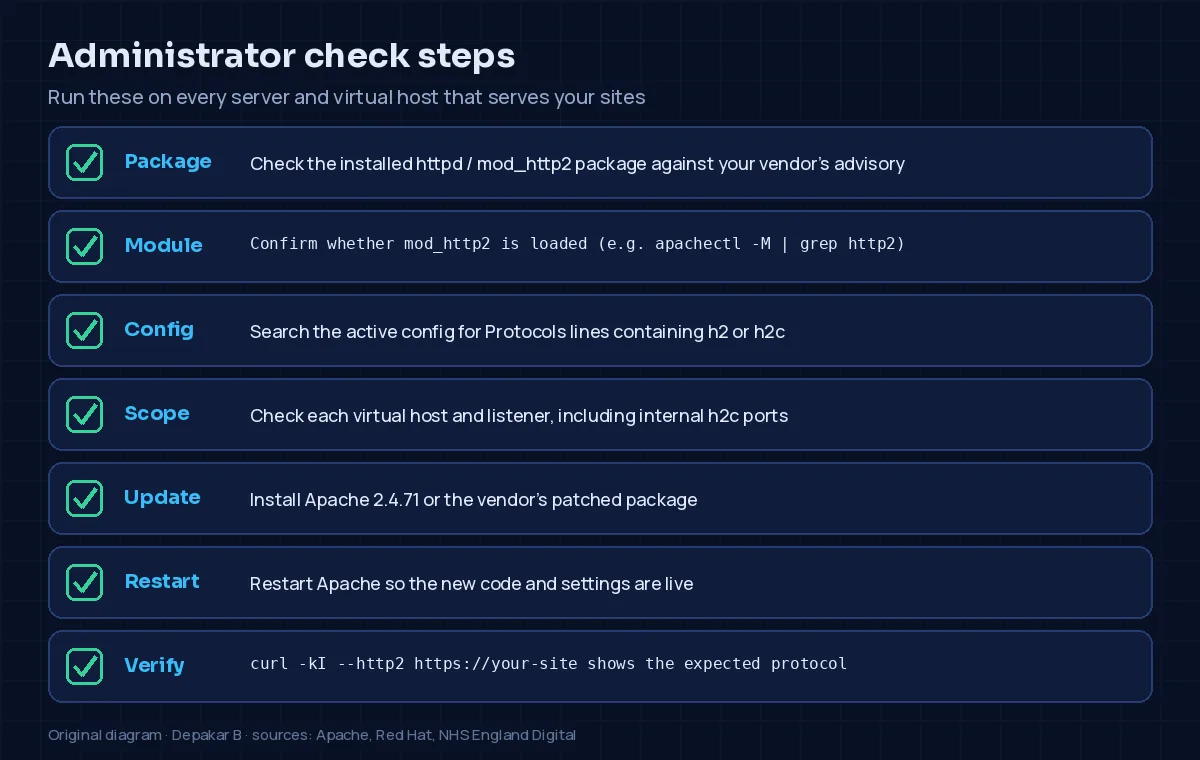
If you manage your own server, work through these steps on every server and virtual host:
- Check the installed
httpd/apache2andmod_http2packages against your vendor's advisory. - Check whether
mod_http2is loaded, for example withapachectl -M | grep http2. - Search the active configuration for
Protocolslines that includeh2orh2c. Red Hat's bulletin givesgrep -r 'Protocols' /etc/httpd/conf/ /etc/httpd/conf.d/for RHEL. On Debian and Ubuntu, look under/etc/apache2/. - Check every virtual host and every reachable listener. Apache's documentation says a
Protocolsline inside a virtual host replaces the server-wide setting for that host. - Install Apache 2.4.71 or your vendor's fixed package, then restart Apache.
- Check the result. Red Hat suggests
curl -kI --http2 https://your-site:HTTP/2 200means HTTP/2 is still on, andHTTP/1.1 200 OKmeans it is off.
The PHP information in your WordPress dashboard does not tell you whether Apache has been patched.
Recommended actions
1. Contact your hosting provider. On shared or managed hosting, ask for written confirmation that the fix is in place and when it was applied.
2. Update Apache. If you run your own servers, install Apache 2.4.71 or your vendor's fixed package. NHS England's alert says organisations "must patch their Apache HTTP Server instances to a fixed, supported version".
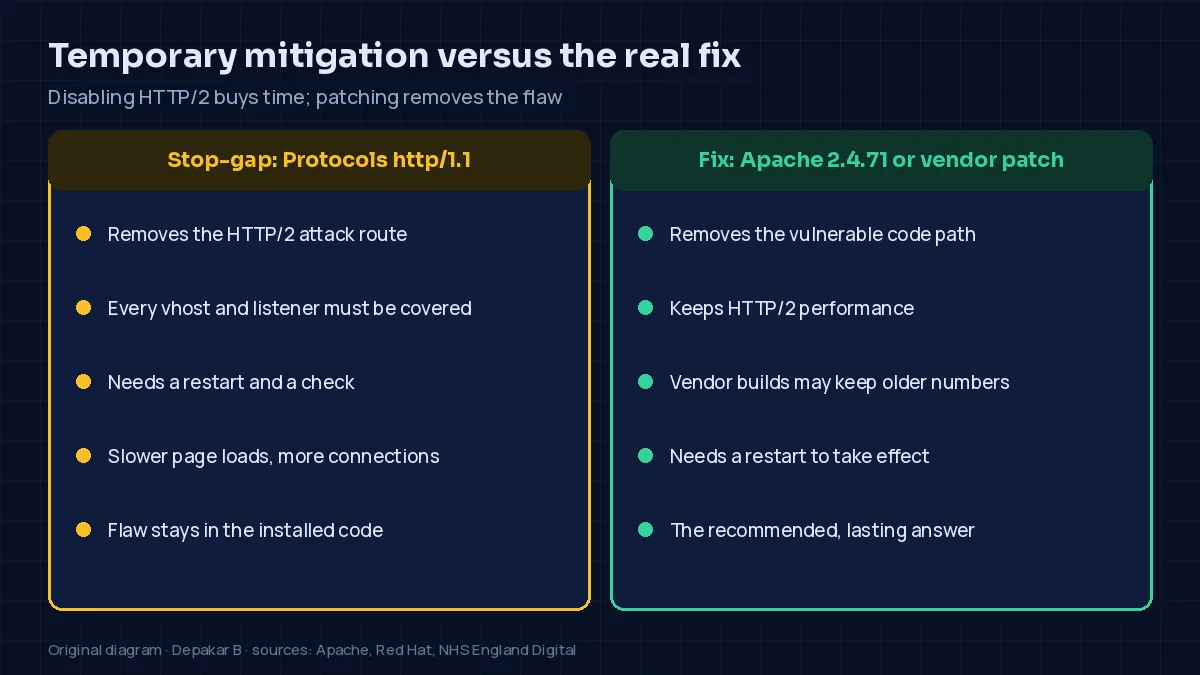
3. Disable HTTP/2 temporarily if you cannot patch yet. Apache's advisory lists no workaround. Red Hat, NHS England and Wiz all suggest removing h2 and h2c from every Protocols directive so that only this remains:
Protocols http/1.1Then restart Apache and confirm that HTTP/2 is refused. Red Hat says browsers fall back to HTTP/1.1 without problems, but pages may load more slowly. This is a stop-gap, not a replacement for the update.
4. Keep backups current. Backups of files and databases help you recover, but they do not prevent an attack.
5. Keep up normal WordPress security. Keep core, themes and plugins updated, and use strong authentication, least-privilege permissions and monitoring. These protect the application, but they cannot fix a server-level flaw.
Frequently asked questions
Does updating WordPress fix CVE-2026-119618?
No. It is a flaw in Apache HTTP Server, so the server administrator or hosting provider has to install the fix.
Does Wordfence protect against this vulnerability?
Not by itself. Wordfence works inside WordPress, and the vulnerable HTTP/2 handling happens in Apache before a request reaches WordPress. SecurityWeek reports that Defiant, the company behind Wordfence, has also warned that WordPress security updates cannot resolve the issue.
Is Apache 2.4.71 safe from this vulnerability?
Apache lists 2.4.71 as the upstream release that fixes CVE-2026-119618. If you use a distribution package, check your vendor's advisory, and watch for later Apache advisories.
What if my site uses HTTP/2 through Cloudflare or another CDN?
Public HTTP/2 support at the CDN does not by itself expose your Apache origin. Check which protocol the CDN uses to reach your origin, and whether anyone can reach Apache directly, bypassing the CDN.
Should I disable HTTP/2 on my website?
Only as a temporary measure, if HTTP/2 is enabled on Apache and the fix cannot be installed yet. The proper fix is the patched package.
What to do today
CVE-2026-119618 is a reminder that a WordPress site is only as secure as the server it runs on. If your site runs on Apache, ask your host whether HTTP/2 is enabled and whether the fix is installed. If you run the server yourself, patch it, restart Apache and check the result. I will update this report if Apache, Red Hat, NHS England or CISA change their guidance or exploit status.
About this report
Based on the Apache HTTP Server security advisory and announcement of 11 November 2026, the CVE record, Red Hat's CVE page and security bulletin RHSB-2026-017, and NHS England Digital cyber alert CC-4892 of 12 November 2026, with independent reporting from SecurityWeek, The Hacker News and Wiz. Facts and quotes are taken from the sources credited below, which I read on 13 November 2026. The checking steps and recommendations are practical guidance, not vendor instructions, so always follow your own vendor's advisory. Exploit status can change quickly, and this report reflects what the sources said on 13 November 2026. I am an independent developer and am not affiliated with the organisations named here.
Credits and sources
- Source: Apache HTTP Server Project: Apache HTTP Server 2.4 vulnerabilities: CVE-2026-119618 (fixed in 2.4.71, 11 November 2026)
- Source: Apache HTTP Server Project via the oss-security mailing list: CVE-2026-119618 announcement by Eric Covener, 11 November 2026
- Source: CVE Program: CVE-2026-119618 record
- Source: Red Hat: CVE-2026-119618 – Red Hat Customer Portal
- Source: Red Hat: RHSB-2026-017 Remote Code Execution – Apache HTTP Server (CVE-2026-119618), 12 November 2026
- Source: NHS England Digital: Cyber alert CC-4892: Critical Remote Code Execution Vulnerability in Apache HTTP Server, 12 November 2026
- Source: Apache HTTP Server documentation: Protocols directive
- Source: Apache HTTP Server documentation: HTTP/2 guide
- Source: SecurityWeek (Eduard Kovacs): Apache Patches Critical HTTP Server RCE Found by Anthropic, Google, 12 November 2026
- Source: The Hacker News (Swati Khandelwal): Critical Apache HTTP/2 Flaw Could Let Unauthenticated Attackers Execute Code Remotely, 12 November 2026
- Source: Wiz: Critical RCE Vulnerability in Apache HTTP Server: Everything You Need To Know, 11 November 2026
- Lead image: Illustration created for this article: computer-generated graphic with headline text, made by Depakar B.
- In-article figures: original diagrams created for this article by Depakar B.
Corrections
Spotted an error? Please contact me. Corrections are noted on this page with the date.